Monocular 3D Indoor Detection
Overview
The mono3d_indoor_detection package is an indoor object 3D detection algorithm example developed based on the hobot_dnn package. It uses a 3D detection model and indoor data on RDK to run model inference on the BPU and obtain inference results.
Compared with 2D object detection, which can only identify object categories and bounding boxes, 3D object detection can identify precise object positions and orientations. For example, in navigation and obstacle avoidance applications, the rich information provided by 3D object detection algorithms can help planning and control modules achieve better obstacle avoidance.
Supported indoor object detection categories include: charging dock, trash can, and slippers.
Detection results for each category include:
-
Length, width, height: The length, width, and height of the 3D object (i.e., a hexahedron), in meters.
-
Rotation: The orientation of the object relative to the camera, in radians, with a range of -π to π, representing the angle between the object's forward direction and the camera coordinate system x-axis in the camera coordinate system.
-
Depth information: The distance from the camera to the object, in meters.
Code repository: (https://github.com/D-Robotics/mono3d_indoor_detection)
Application scenarios: Monocular 3D indoor detection can directly identify the exact position and orientation of objects in an image, enabling object pose recognition. It is mainly used in autonomous driving, smart home, and related fields.
Monocular 3D vehicle detection example: (https://github.com/RayXie29/Kaggle-Peking-University-Baidu-Autonomous-Driving-32-place-solution)
Supported Platforms
| Platform | Runtime | Example Features |
|---|---|---|
| RDK X3, RDK X3 Module | Ubuntu 20.04 (Foxy), Ubuntu 22.04 (Humble) | Start MIPI/USB camera and display inference rendering results via Web |
| RDK X5, RDK X5 Module | Ubuntu 22.04 (Humble) | Start MIPI/USB camera and display inference rendering results via Web |
| X86 | Ubuntu 20.04 (Foxy) | · Start local image playback; save inference rendering results locally |
Algorithm Information
| Model | Platform | Input Size | Inference FPS |
|---|---|---|---|
| centernet | X3 | 1x3x512x960 | 85.93 |
| centernet | X5 | 1x3x512x960 | 196.33 |
Preparation
RDK Platform
-
RDK has been flashed with the Ubuntu system image.
-
TogetheROS.Bot has been successfully installed on RDK.
X86 Platform
-
Ubuntu 20.04 system image has been configured on the X86 environment.
-
tros.b has been successfully installed on the X86 environment.
Usage
Since 3D detection models are related to camera parameters, different cameras require parameter adjustments.
The monocular 3D indoor detection example package reads local images for detection inference. After algorithm inference, it detects object categories and 3D localization information and publishes algorithm messages containing 3D detection information. Users can subscribe to 3D detection result messages for application development.
RDK Platform
- Foxy
- Humble
# 配置tros.b环境
source /opt/tros/setup.bash
# 配置tros.b环境
source /opt/tros/humble/setup.bash
# 从tros.b的安装路径中拷贝出运行示例需要的配置文件。
cp -r /opt/tros/${TROS_DISTRO}/lib/mono3d_indoor_detection/config/ .

# 启动launch文件
ros2 launch mono3d_indoor_detection mono3d_indoor_detection.launch.py
X86 Platform
# 配置tros.b环境
source /opt/tros/setup.bash

# 从tros.b的安装路径中拷贝出运行示例需要的配置文件。
cp -r /opt/tros/${TROS_DISTRO}/lib/mono3d_indoor_detection/config/ .

# 启动launch文件
ros2 launch mono3d_indoor_detection mono3d_indoor_detection.launch.py
Result Analysis
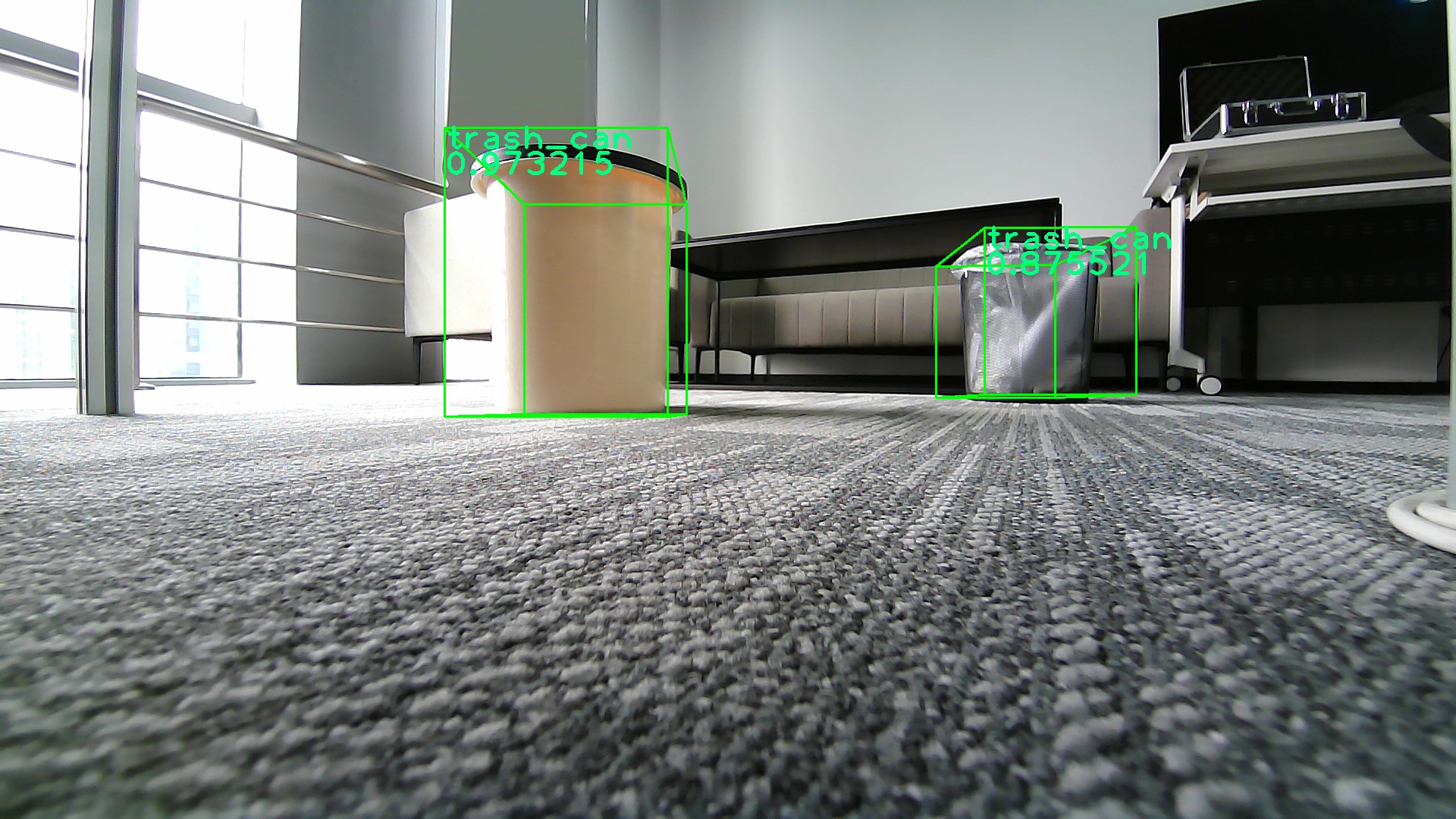
After the mono3d_indoor_detection package processes one frame of image data, the runtime terminal outputs the following information:
[mono3d_indoor_detection-1] [INFO] [1662612553.868256257] [mono3d_detection]: target type: trash_can
[mono3d_indoor_detection-1] [INFO] [1662612553.868303755] [mono3d_detection]: target type: width, value: 0.236816
[mono3d_indoor_detection-1] [INFO] [1662612553.868358420] [mono3d_detection]: target type: height, value: 0.305664
[mono3d_indoor_detection-1] [INFO] [1662612553.868404002] [mono3d_detection]: target type: length, value: 0.224182
[mono3d_indoor_detection-1] [INFO] [1662612553.868448000] [mono3d_detection]: target type: rotation, value: -1.571989
[mono3d_indoor_detection-1] [INFO] [1662612553.868487790] [mono3d_detection]: target type: x, value: -0.191978
[mono3d_indoor_detection-1] [INFO] [1662612553.868530705] [mono3d_detection]: target type: y, value: -0.143963
[mono3d_indoor_detection-1] [INFO] [1662612553.868570870] [mono3d_detection]: target type: z, value: 0.714024
[mono3d_indoor_detection-1] [INFO] [1662612553.868611119] [mono3d_detection]: target type: depth, value: 0.714024
[mono3d_indoor_detection-1] [INFO] [1662612553.868651409] [mono3d_detection]: target type: score, value: 0.973215
[mono3d_indoor_detection-1] [INFO] [1662612553.868760238] [mono3d_detection]: target type: trash_can
[mono3d_indoor_detection-1] [INFO] [1662612553.868799486] [mono3d_detection]: target type: width, value: 0.253052
[mono3d_indoor_detection-1] [INFO] [1662612553.868842610] [mono3d_detection]: target type: height, value: 0.282349
[mono3d_indoor_detection-1] [INFO] [1662612553.868885191] [mono3d_detection]: target type: length, value: 0.257935
[mono3d_indoor_detection-1] [INFO] [1662612553.868929273] [mono3d_detection]: target type: rotation, value: -1.542728
[mono3d_indoor_detection-1] [INFO] [1662612553.868968855] [mono3d_detection]: target type: x, value: 0.552460
[mono3d_indoor_detection-1] [INFO] [1662612553.869010645] [mono3d_detection]: target type: y, value: -0.164073
[mono3d_indoor_detection-1] [INFO] [1662612553.869050018] [mono3d_detection]: target type: z, value: 1.088358
[mono3d_indoor_detection-1] [INFO] [1662612553.869088767] [mono3d_detection]: target type: depth, value: 1.088358
[mono3d_indoor_detection-1] [INFO] [1662612553.869126765] [mono3d_detection]: target type: score, value: 0.875521
The log excerpt shows the processing result of one frame. The results show that the target type in the subscribed algorithm message is trash_can, along with 3D dimensions, distance, and rotation angle information for trash_can.
The rendering result of reading a local image (you can replace the image by modifying the feed_image field in mono3d_indoor_detection.launch.py) is saved as an image in the result directory where the program runs. The corresponding image inference result and rendering information are shown below: