Gesture Recognition
Introduction
The gesture recognition example subscribes to algorithm messages containing hand bounding boxes and hand keypoint information, performs inference on the BPU, and publishes smart result messages containing gesture information.
Supported gesture recognition categories and their corresponding values in the algorithm message (Attribute member, type is "gesture") are as follows:
- Static Gestures
| Gesture | Description | Value |
|---|---|---|
| ThumbUp | Thumbs up | 2 |
| Victory | "V" gesture | 3 |
| Mute | "Shush" gesture | 4 |
| Palm | Palm | 5 |
| Okay | OK gesture | 11 |
| ThumbLeft | Thumb pointing left | 12 |
| ThumbRight | Thumb pointing right | 13 |
| Awesome | 666 gesture | 14 |
- Dynamic Gestures
| Gesture | Description | Value |
|---|---|---|
| PinchMove | Three-finger pinch and drag | 15 |
| PinchRotateAntiClockwise | Three-finger pinch counterclockwise circle | 16 |
| PinchRotateClockwise | Three-finger pinch clockwise circle | 17 |
Code repository:
(https://github.com/D-Robotics/hand_lmk_detection)
(https://github.com/D-Robotics/hand_gesture_detection)
(https://github.com/D-Robotics/mono2d_body_detection)
Application scenarios: Gesture recognition integrates hand keypoint detection, gesture analysis, and other technologies, enabling computers to interpret human gestures as corresponding commands. It supports gesture control and sign language translation, and is mainly used in smart home, smart cockpit, smart wearables, and other fields.
Car gesture control example: 5.4.5 Car Gesture Control
Game character control example based on gesture recognition and body pose analysis: Master the X3 Board: Fitness and Gaming Combined
Supported Platforms
| Platform | Runtime Environment | Example Functionality |
|---|---|---|
| RDK X3, RDK X3 Module | Ubuntu 20.04 (Foxy), Ubuntu 22.04 (Humble) | Start MIPI/USB camera and display inference rendering results via Web |
| RDK X5, RDK X5 Module | Ubuntu 22.04 (Humble) | Start MIPI/USB camera and display inference rendering results via Web |
Algorithm Info
| Model | Platform | Input Size | Inference FPS |
|---|---|---|---|
| gestureDet | X3 | 8x21 | 2020 |
| gestureDet | X5 | 8x21 | 1252.44 |
Preparation
RDK Platform
-
The RDK has been flashed with the Ubuntu system image.
-
TogetheROS.Bot has been successfully installed on the RDK.
-
A MIPI or USB camera has been installed on the RDK.
-
Confirm that the PC can access the RDK over the network.
Usage
The gesture recognition (hand_gesture_detection) package subscribes to hand keypoint detection results published by the hand keypoint detection package. After inference, it publishes algorithm messages, and uses the websocket package to render and display the published images and corresponding algorithm results in a PC browser.
Start Dynamic Gesture Recognition
The launch script starts static gesture recognition by default. You can switch to dynamic gesture recognition only at runtime using the is_dynamic_gesture parameter, for example: ros2 launch hand_gesture_detection hand_gesture_detection.launch.py is_dynamic_gesture:=True.
The examples below start static gesture recognition by default.
-
The
ros2 launch hand_gesture_detection hand_gesture_detection.launch.pylaunch command supports outputting either static or dynamic gesture recognition, but not both. To start static and dynamic gesture recognition simultaneously, use theros2 launch hand_gesture_detection hand_gesture_fusion.launch.pylaunch command. -
Dynamic gesture recognition is only available in
TROS Humble 2.3.1and later versions. TROS release notes: 1.6 Release Notes. Version check method: 1.2 apt Installation and Upgrade.
Using MIPI Camera
- Foxy
- Humble
# Configure tros.b environment
source /opt/tros/setup.bash
# Configure tros.b environment
source /opt/tros/humble/setup.bash
# Copy the configuration files required to run the example from the tros.b installation path.
cp -r /opt/tros/${TROS_DISTRO}/lib/mono2d_body_detection/config/ .
cp -r /opt/tros/${TROS_DISTRO}/lib/hand_lmk_detection/config/ .
cp -r /opt/tros/${TROS_DISTRO}/lib/hand_gesture_detection/config/ .

# Configure MIPI camera
export CAM_TYPE=mipi

# Launch launch file
ros2 launch hand_gesture_detection hand_gesture_detection.launch.py
Using USB Camera
- Foxy
- Humble
# Configure tros.b environment
source /opt/tros/setup.bash
# Configure tros.b environment
source /opt/tros/humble/setup.bash
# Copy the configuration files required to run the example from the tros.b installation path.
cp -r /opt/tros/${TROS_DISTRO}/lib/mono2d_body_detection/config/ .
cp -r /opt/tros/${TROS_DISTRO}/lib/hand_lmk_detection/config/ .
cp -r /opt/tros/${TROS_DISTRO}/lib/hand_gesture_detection/config/ .

# Configure USB camera
export CAM_TYPE=usb

# Launch launch file
ros2 launch hand_gesture_detection hand_gesture_detection.launch.py
Using Local Image Feedback
This feature is only supported in TROS Humble 2.3.1 and later versions.
TROS release notes: 1.6 Release Notes. Version check method: 1.2 apt Installation and Upgrade.
- Humble
# Configure tros.b environment
source /opt/tros/humble/setup.bash
# Copy the configuration files required to run the example from the tros.b installation path.
cp -r /opt/tros/${TROS_DISTRO}/lib/mono2d_body_detection/config/ .
cp -r /opt/tros/${TROS_DISTRO}/lib/hand_lmk_detection/config/ .
cp -r /opt/tros/${TROS_DISTRO}/lib/hand_gesture_detection/config/ .

# Configure local image feedback
export CAM_TYPE=fb

# Launch launch file
ros2 launch hand_gesture_detection hand_gesture_detection.launch.py publish_image_source:=config/person_face_hand.jpg publish_image_format:=jpg publish_output_image_w:=960 publish_output_image_h:=544 publish_fps:=30
Result Analysis
The terminal output during execution is as follows:
[hand_gesture_detection-5] [C][32711][08-12][09:39:39:575][configuration.cpp:49][EasyDNN]EasyDNN version: 0.4.11
[hand_gesture_detection-5] [DNN] Runtime version = 1.9.7_(3.14.5 HBRT)
[hand_gesture_detection-5] [WARN] [1660268379.611419981] [hand gesture det node]: input_idx: 0, tensorType = 8, tensorLayout = 0
[hand_gesture_detection-5] [WARN] [1660268379.619313022] [hand gesture det node]: Create subscription with topic_name: /hobot_hand_lmk_detection
[hand_gesture_detection-5] [WARN] [1660268379.629207314] [hand gesture det node]: ai_msg_pub_topic_name: /hobot_hand_gesture_detection
[mono2d_body_detection-3] (MOTMethod.cpp:39): MOTMethod::Init config/iou2_euclid_method_param.json
[mono2d_body_detection-3]
[mono2d_body_detection-3] (IOU2.cpp:34): IOU2 Mot::Init config/iou2_euclid_method_param.json
[mono2d_body_detection-3]
[mono2d_body_detection-3] (MOTMethod.cpp:39): MOTMethod::Init config/iou2_method_param.json
[mono2d_body_detection-3]
[mono2d_body_detection-3] (IOU2.cpp:34): IOU2 Mot::Init config/iou2_method_param.json
[mono2d_body_detection-3]
[mono2d_body_detection-3] (MOTMethod.cpp:39): MOTMethod::Init config/iou2_method_param.json
[mono2d_body_detection-3]
[mono2d_body_detection-3] (IOU2.cpp:34): IOU2 Mot::Init config/iou2_method_param.json
[mono2d_body_detection-3]
[mono2d_body_detection-3] (MOTMethod.cpp:39): MOTMethod::Init config/iou2_method_param.json
[mono2d_body_detection-3]
[mono2d_body_detection-3] (IOU2.cpp:34): IOU2 Mot::Init config/iou2_method_param.json
[mono2d_body_detection-3]
[hand_gesture_detection-5] [WARN] [1660268381.026173815] [hand_gesture_det]: Sub smart fps 31.16
[hand_gesture_detection-5] [WARN] [1660268381.206196565] [hand_gesture_det]: Pub smart fps 30.17
[hand_gesture_detection-5] [WARN] [1660268382.054034899] [hand_gesture_det]: Sub smart fps 30.19
[hand_gesture_detection-5] [WARN] [1660268382.234087357] [hand_gesture_det]: Pub smart fps 30.19
[hand_gesture_detection-5] [WARN] [1660268383.055988982] [hand_gesture_det]: Sub smart fps 29.97
[hand_gesture_detection-5] [WARN] [1660268383.235230316] [hand_gesture_det]: Pub smart fps 30.00
[hand_gesture_detection-5] [WARN] [1660268384.087152150] [hand_gesture_det]: Sub smart fps 30.10
[hand_gesture_detection-5] [WARN] [1660268384.256141566] [hand_gesture_det]: Pub smart fps 30.39
The output log shows that the program ran successfully. During inference, the algorithm input and output frame rate is 30 fps, with statistics refreshed once per second.
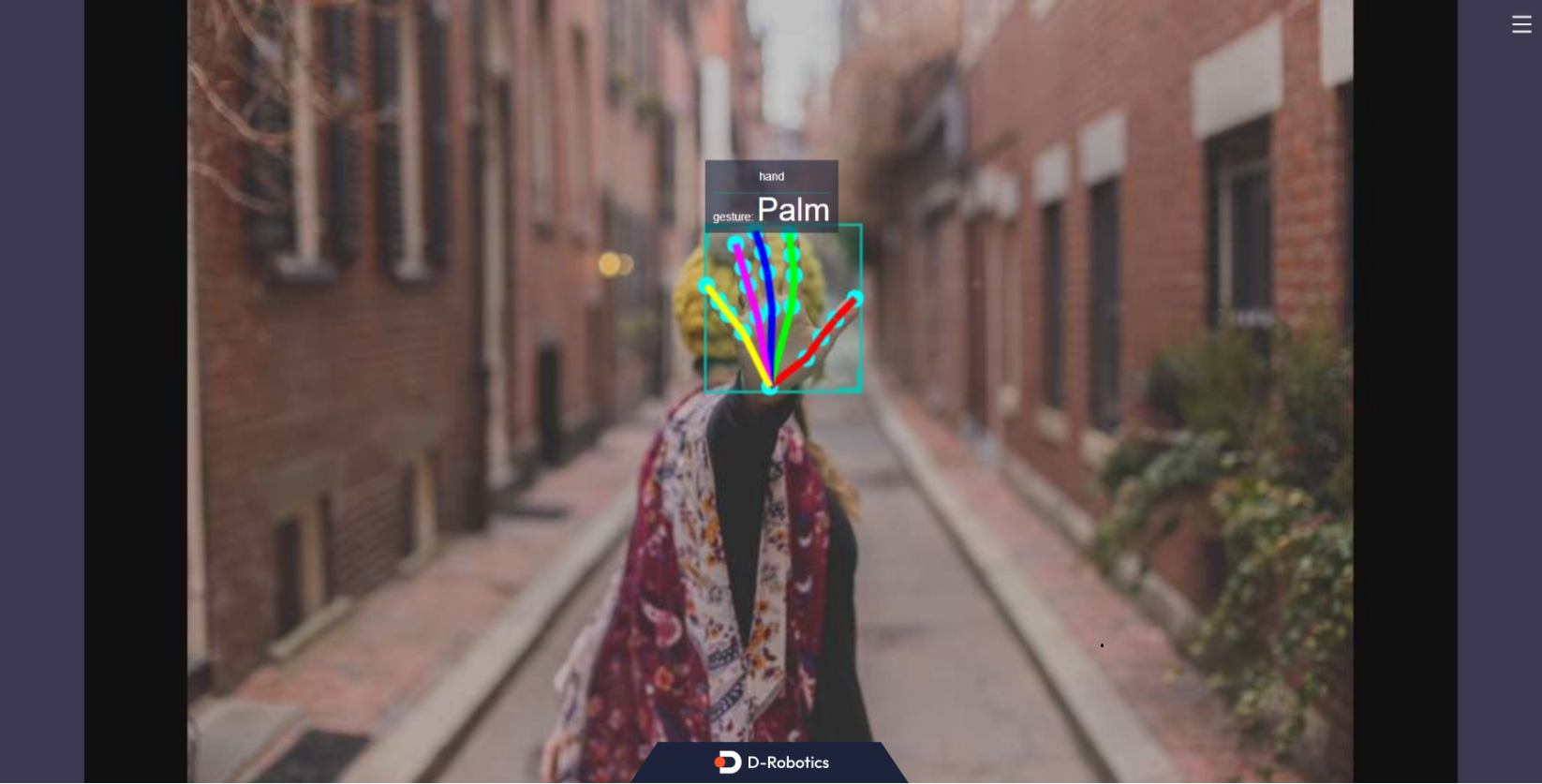
The output log shows that the subscribed algorithm message contains one hand (including hand bounding box and hand keypoint detection results), and the gesture recognition algorithm output gesture classification result is the "Palm" gesture (classification result is 5).
Enter http://IP:8000 in a PC browser to view the image and algorithm rendering results (IP is the RDK IP address):