7.5.9 IPC User Guide
This chapter focuses on MCU-side usage. For more details on IPC principles and usage, refer to IPC Module Introduction.
Usage Restrictions
- When using the
Ipc_MDMA_SendMsginterface to send data, the data buffer address must be 16-byte aligned. - The send function checks DMA status by polling, so DMA interrupts must be disabled before using the send function (the release code disables them by default). When using the receive function, configure DMA interrupts and IPC interrupts with the same priority to avoid mutual preemption.
- There are only two Ipc MDMA send channels. For single-core or multi-core multi-task sending, it is recommended to use spin locks or interrupt disable to control DMA resource contention.
- IPC multi-core send/receive is allocated by Instance and does not support allocation by Channel.
- IPC initialization must be called after the DMA module is initialized.
- MCU IPC configuration must match the peer-side IPC configuration, including Instance control segment and data segment addresses, Channel count and IDs, Buffer data, and Buffer size. Inconsistent configuration on both sides will cause IPC communication failure.
- The
receive_coreidfield in Instance cfg must clearly indicate whether the Instance runs on MCU0 or MCU1. If it runs on MCU1, configure it asIpc_Receive_Core1. Incorrect configuration will cause IPC communication failure. - IPC interrupts must be enabled on the MCU where the Instance runs. If enabled on multiple cores, interrupts may be preempted by other cores and cause IPC communication failure.
IPC Configuration
One IPC instance has one or more channels. All channels in the same instance share one interrupt, so one IPC can only be enabled on either MCU0 or MCU1.
When MCU1 uses IPC, two parts of configuration are required:
- Configure callback functions. Their purpose is to trigger an interrupt and enter the callback when IPC receives a notify signal. Customers can also customize callbacks for transmission errors. The example below uses Instance0.
static Ipc_ChannelConfigType Ipc_ShmInstance0CfgChannel[8] = {
{
    .ChannelId = 0,
    .ChannelData   = {
        .NumPools = 1,
        .PoolCfg        = Ipc_ShmIpcInstance_0CfgIpcChannel_0BufPool,
        .RxCallback     = IpcTp_InsCan_RxCallback,
        .RxCallbackArg  = (NULL_PTR),
        .TxErrCallback    = DefaultTxErrCallback,
        .TxErrCallbackArg = (NULL_PTR),
    },
},
......
};
- Set
receive_coreid. If running on MCU1, setreceive_coreid=Ipc_Receive_Core1. At the same time, ensure the IPC settings on MCU0 are consistent.
- MCU0 file path:
/mcu/Config/McalCdd/gen_s100_sip_B/Ipc/src/Ipc_Cfg.c - MCU1 file path:
/mcu/Config/McalCdd/gen_s100_sip_B_mcu1/Ipc/src/Ipc_Cfg.c
Ipc_InstanceConfigType Ipc_ShmCfgInstances0 = {
    .Ipc_InstanceId       = 0U,
    .Ipc_ChannelNum       = 8U,
    .LocalCtlAddr         = 0xcdd9e00,
    .RemoteCtlAddr        = 0xcdd9400,
    .CtlShmSize           = 0xa00,
    .LocalDataAddr        = 0xb4080000,
    .RemoteDataAddr       = 0xb4000000,
    .DataShmSize          = 0x80000,
    .SendDmaChanIdx       = 0xffU,
    .Async                = (TRUE),
    .HwInfo               = {
        .Ipc_HwId         = CPU_IPC0,/**< the id of the Hardware */
        .RecvIrqUsed      = (TRUE),/**< Whether to use Recv interrupt */
        .SendMboxId       = 0,/**< the mailbox id */
        .RecvMboxId       = 16,/**< the mailbox id */
        .RemoteIrq        = 16,
        .LocalIrq         = 0,
        .UseMDMA          = (TRUE),
    },
    .Ipc_ChannelConfigPtr = Ipc_ShmInstance0CfgChannel,
    .receive_coreid = Ipc_Receive_Core1,
};
IPC Usage
| MCU IPC Instance | Using Module | Interrupt Func | Opposite End |
|---|---|---|---|
| Ipc_ShmCfgInstances0~8 | User | ISR(Ipc_CpuIpc0Ch0Isr): Ipc_Driver_CpuIpc0ChxIsr() (x=0..8) | Acore instance0~8 |
| Ipc_ShmCfgInstances0/4 | canhal | — | Acore instance0/4 |
| Ipc_ShmCfgInstances5 | External RTC | — | Acore instance5 |
| Ipc_ShmCfgInstances7 | ipcbox | — | Acore instance7 |
| Ipc_ShmCfgInstances8 | mcu1 boot | — | Acore instance8 |
| Ipc_PrivShmCfgInstance0 | Crypto | ISR(Ipc_HsmIpc1Ch4Isr): Ipc_Driver_HSMIpc1Ch4Isr() | HSM |
| Ipc_PrivShmCfgInstance1 | HSM DIAG | ISR(Ipc_HsmIpc1Ch5Isr): Ipc_Driver_HSMIpc1Ch5Isr() | HSM |
| Ipc_PrivShmCfgInstance3 | TimeSync | ISR(Ipc_CpuIpc0Ch10Isr): Ipc_Driver_CpuIpc0Ch10Isr() | Acore Instance10 |
| Ipc_PrivShmCfgInstance4 | Ota | ISR(Ipc_CpuIpc0Ch11Isr): Ipc_Driver_CpuIpc0Ch11Isr() | Acore Instance11 |
| Ipc_PrivShmCfgInstance5 | QGA | ISR(Ipc_CpuIpc0Ch12Isr): Ipc_Driver_CpuIpc0Ch12Isr() | Acore Instance12 |
| Housekeeping | Housekeeping | ISR(Ipc_CpuIpc0Ch15Isr): Housekeeping_IrqHandler() | Acore Housekeeping |
| scmi | scmi | ISR(Ipc_CpuIpc1Ch0Isr): ScmiIpc_Irq0Handler() ISR(Ipc_CpuIpc1Ch1Isr): ScmiIpc_Irq1Handler() ISR(Ipc_CpuIpc1Ch2Isr): ScmiIpc_Irq2Handler() | Acore scmi |
| MCU IPC Instance | Using Module | Interrupt Func | Opposite End |
|---|---|---|---|
| Ipc_ShmCfgInstances0~7 | User | ISR(Ipc0_ChxIsr): Ipc_Driver_MCUIpc0ChxIsr() (x = 0..7) | Acore instance0~7 |
| Ipc_ShmCfgInstances0 / 4 | canhal | — | Acore instance0/4 |
| Ipc_ShmCfgInstances5 | External RTC | — | Acore instance5 |
| Ipc_ShmCfgInstances7 | ipcbox | — | Acore instance7 |
| Ipc_ShmCfgInstances8~15 | User | ISR(Ipc1_ChxIsr): Ipc_Driver_MCUIpc1ChxIsr() (x = 0..7) | Acore instance8~15 (except 8 & 10) |
| Ipc_ShmCfgInstance8 | mcu1 boot | — | Acore instance8 |
| Ipc_ShmCfgInstance10 | timesync | — | Acore instance10 |
| Ipc_PrivShmCfgInstance0 | Crypto | ISR(Ipc_HsmIpc3Ch4Isr): Ipc_Driver_HSMIpc3Ch4Isr() | HSM |
| Ipc_PrivShmCfgInstance1 | HSM Diag | ISR(Ipc_HsmIpc3Ch5Isr): Ipc_Driver_HSMIpc3Ch5Isr() | HSM |
| Ipc_PrivShmCfgInstance2 | Ota | ISR(Ipc0_Ch8Isr): Ipc_Driver_MCUIpc0Ch8Isr() | Acore instance50 |
| Ipc_PrivShmCfgInstance3 | QGA | ISR(Ipc0_Ch9Isr): Ipc_Driver_MCUIpc0Ch9Isr() | Acore instance51 |
| Housekeeping | Housekeeping | ISR(Ipc2_Ch3Isr): Housekeeping_IrqHandler() | Acore Housekeeping |
Application Sample
All application samples run on the Acore side and communicate with MCU1. Therefore, the MCU1 system must be running before use.
How to run: MCU1 Startup Steps
IpcBox Overview
IpcBox is an application extension built on the MCU-side IPC communication framework. It is used to manage peripheral passthrough functionality. Its implementation diagram is shown below:
Peripherals are connected to IpcBox through a unified interface for management. In simple terms, peripheral data is forwarded through IPC Box and returned to the Acore side. Likewise, data from the Acore side is forwarded through IpcBox to operate the actual peripherals. The data flow is: Acore<->IPC<->MCU<->Peri
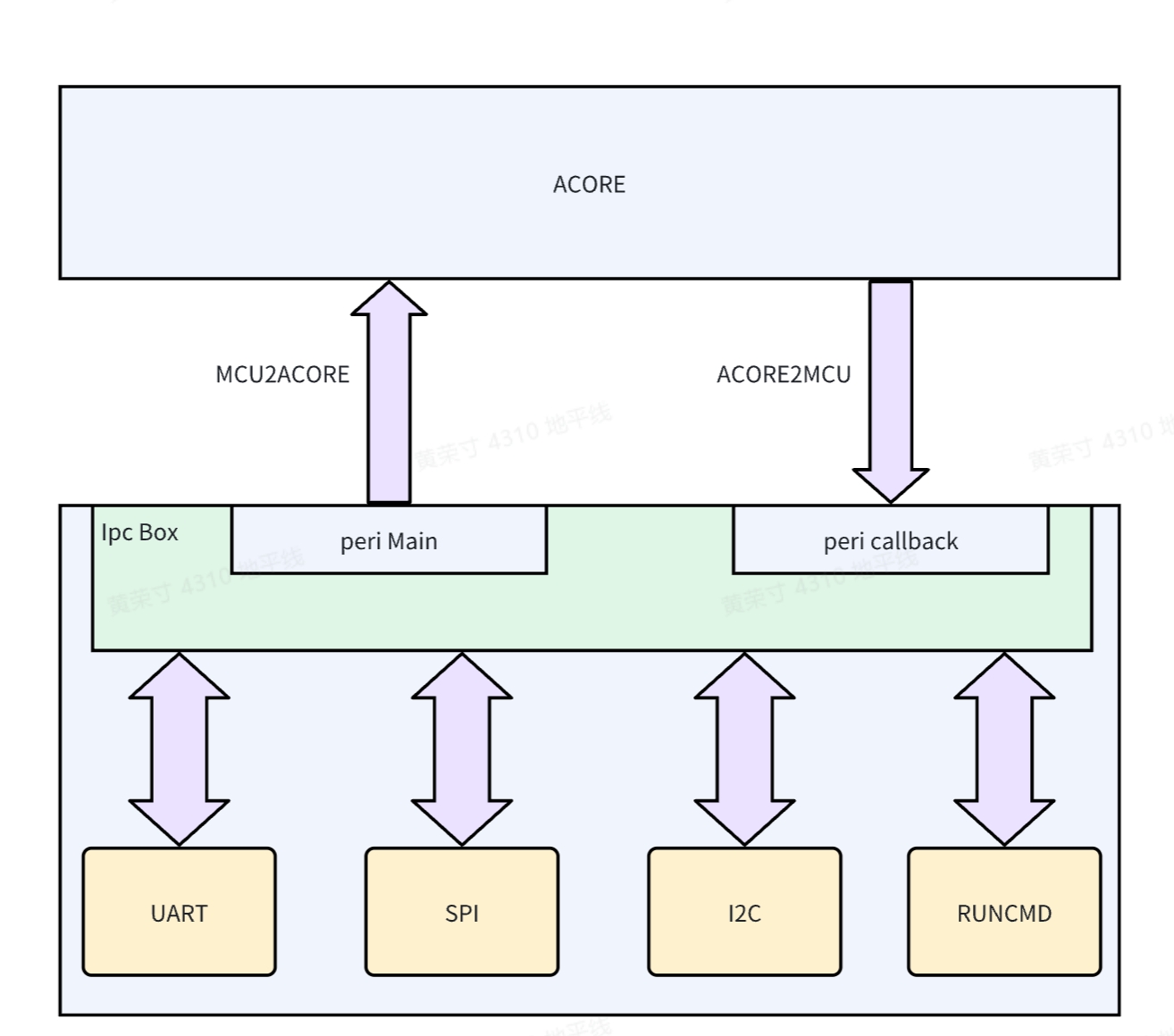
For the corresponding Acore-side application, see the IPC Module Introduction chapter.
IpcBox was refactored during the upgrade from RDKS100 V4.0.4-Beta to RDKS100 V4.0.5-Beta. The changes include packet structure, IPC channels, and default passthrough peripheral configuration. Pay attention to version compatibility between the MCU side and the Acore side.
Passthrough Peripheral Data
Implementation Status:
| Item | Status | Notes |
|---|---|---|
| RunCmd | Implemented | None |
| SPI | Implemented | None |
| I2C | Implemented | None |
| Uart | Implemented | Fixed to use Uart5 |
Protocol Packet Parsing
In general, the packet occupies 128 bytes. The packet length can be extended through data field 2 at the end. It is recommended to keep it at 128 bytes so that when 64-byte aligned memory is allocated for the packet, the data[] array remains 64-byte aligned.
typedef struct {
    uint32 magic; // Magic number
    uint32 version; // Version number
    uint32 checksum; // Checksum
    uint32 length; // Total packet length
    char cmd[MAX_CMD_LENGTH]; // Data field 1
    uint8 reserve[48]; // Reserved
    uint8 data[]; // Data field 2
} IpcBoxPacket_t;
Usage
Because IpcBox occupies peripheral resources, this feature is disabled by default at boot. Enable it manually if needed. There are two ways to enable it:
- Modify the array configuration in the MCU SDK, locate the corresponding peripheral, and change
DISABLEtoENABLE// Service/HouseKeeping/ipc_box/src/ipc_box.c
static Ipcbox_ComType IpcBox_InstanceMap[] = {
{ IPCBOX_COM_ID_RUNCMD, "runcmd", IpcConf_IpcInstance_IpcInstance_7,
IpcConf_IpcInstance_7_IpcChannel_0, ENABLE, IPCBOX_PERIID_INVALID,
IpcBox_RunCmdInit, IpcBox_RunCmdDeinit },
{ IPCBOX_COM_ID_UART, "uart", IpcConf_IpcInstance_IpcInstance_7,
IpcConf_IpcInstance_7_IpcChannel_1, DISABLE, UART5_CHANNEL,
IpcBox_UartInit, IpcBox_UartDeinit },
{ IPCBOX_COM_ID_SPI, "spi", IpcConf_IpcInstance_IpcInstance_7,
IpcConf_IpcInstance_7_IpcChannel_2, DISABLE, IPCBOX_PERIID_INVALID,
IpcBox_SpiInit, IpcBox_SpiDeinit },
{ IPCBOX_COM_ID_I2C, "i2c", IpcConf_IpcInstance_IpcInstance_7,
IpcConf_IpcInstance_7_IpcChannel_3, DISABLE, IPCBOX_PERIID_INVALID,
IpcBox_I2cInit, IpcBox_I2cDeinit },
}; - This is a temporary enable method through the MCU1 command line, for example:
- Check passthrough peripheral enable status
D-Robotics:/$ ipcbox_set_mode debug
[066378.758965 0]Module: runcmd, Enable
[066378.759240 0]Module: uart, Enable
[066378.759663 0]Module: spi, Enable
[066378.760075 0]Module: i2c, Enable- Enable and disable IpcBox UART passthrough
D-Robotics:/$ ipcbox_set_mode uart 1
[066386.990200 0]uart processing enabled
[066386.990487 0]IpcBox_FreeRtos_OsTask_IpcBox_Uart_ASW task is already initialized or running

D-Robotics:/$ ipcbox_set_mode uart 0
[066389.201404 0]uart processing disabled
[066389.267399 0]IpcBox_uart task resources released and terminating
[066389.701820 0]IpcBox_uart task exited properly- Enable and disable IpcBox I2C passthrough
D-Robotics:/$ ipcbox_set_mode i2c 1
[066394.631826 0]i2c processing enabled
[066394.632101 0]IpcBox_FreeRtos_OsTask_IpcBox_I2c_ASW task is already initialized or running

D-Robotics:/$ ipcbox_set_mode i2c 0
[066397.082288 0]i2c processing disabled
[066397.085213 0]IpcBox_i2c task resources released and terminating
[066397.087215 0]IpcBox_i2c task exited properly- Enable and disable IpcBox SPI passthrough
D-Robotics:/$ ipcbox_set_mode spi 1
[066403.227424 0]spi processing enabled
[066403.227699 0]IpcBox_Spi task is already initialized or running

D-Robotics:/$ ipcbox_set_mode spi 0
[066406.388582 0]spi processing disabled
[066406.389522 0]IpcBox_spi task resources released and terminating
[066406.393520 0]IpcBox_spi task exited properly
Log Control
IpcBox log output can be dynamically enabled or disabled using the ipcbox_loglevel command:
D-Robotics:/$ ipcbox_loglevel help
Usage: loglevel <level|subcommand>
  level: 0=NO_LOG, 1=ERROR, 2=WARN, 3=INFO, 4=DEBUG
  subcommands:
    show - show current log level
    help - show this message
Enter ipcbox_loglevel 0 for minimal logging, and ipcbox_loglevel 4 for maximum logging:
D-Robotics:/$ ipcbox_loglevel 0
[066736.123326 0]This is an ERROR message

D-Robotics:/$ ipcbox_loglevel 4
[066738.473668 0]Log level changed to 4
[066738.473942 0]This is an ERROR message
[066738.474408 0]This is a WARN message
[066738.474853 0]This is an INFO message
[066738.475309 0]This is a DEBUG message
IpcBox RunCmd Implementation
Based on commands sent from the Acore side, the MCU-side CMD application is executed. This is referred to as the RunCmd application.
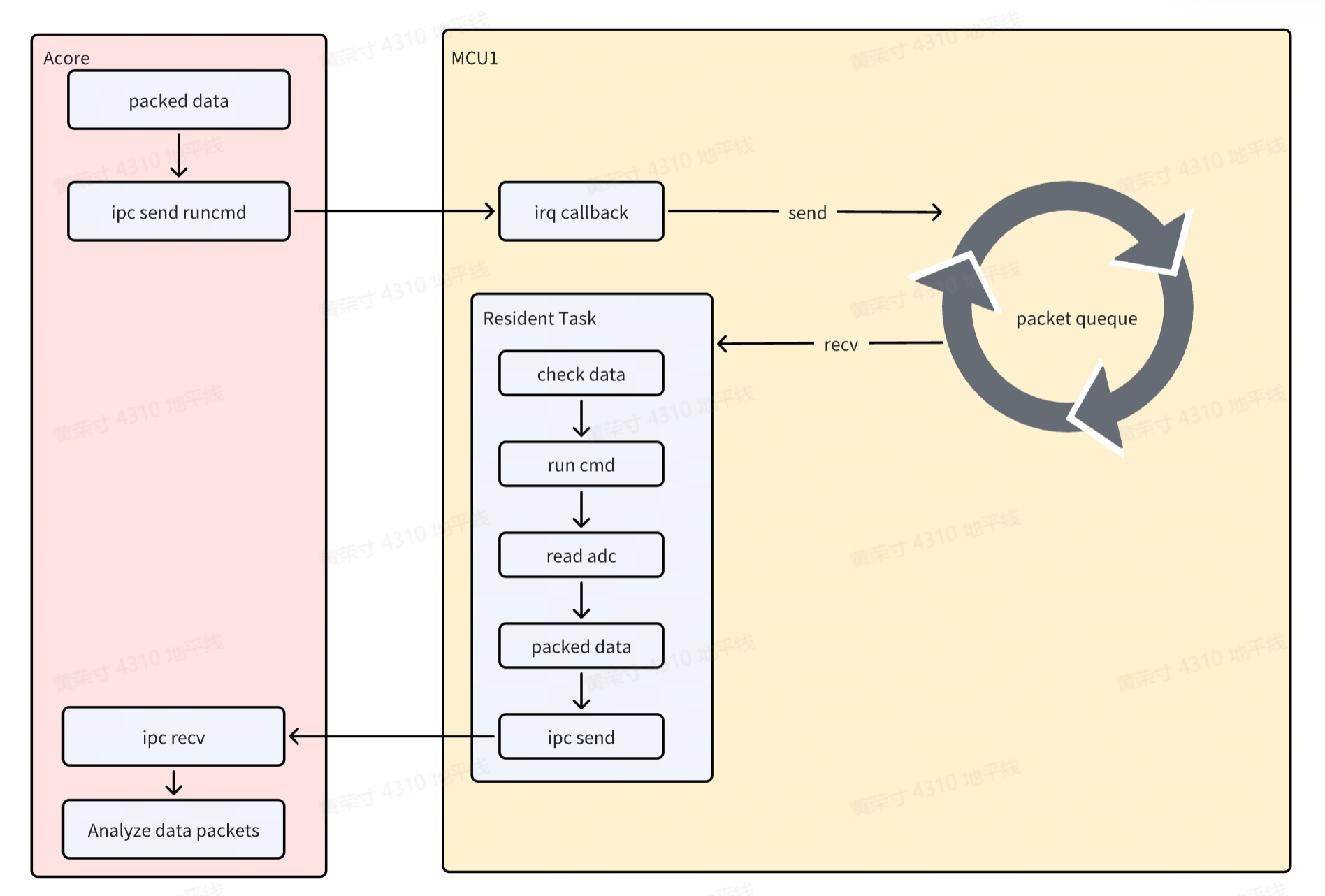
Peripheral data forwarding through IPC Box follows a similar principle and mainly consists of the following two processes:
Acore->Ipc->MCUprocess- When Acore sends data to MCU, an MCU interrupt is triggered. In the interrupt callback, the data is stored in a queue.
MCU->Ipc->Acoreprocess- MCU has a resident thread that continuously checks whether the queue is empty. If not, it validates and parses the data, identifies the cmd command, and executes it.
- The FreeRTOS cmd application is similar to u-boot cmd commands. In this way, users can easily customize their own applications. In this scenario, the executed cmd reads ADC values and returns them to Acore through IPC.
IpcBox Uart Implementation
Similar to RunCmd, in this scenario an MCU interrupt is triggered when MCU sends data to Acore, but a queue is not used for storage.
The implementation mainly consists of the following two processes:
Acore->Ipc->MCUprocess- When Acore sends data to MCU, an MCU interrupt is triggered. The data is parsed in the interrupt and sent through the Uart peripheral.
MCU->Ipc->Acoreprocess- MCU has a resident thread that continuously calls the Uart peripheral to receive data. When data is available, it is packed and forwarded to Acore.
IpcBox I2c Implementation
Similar to RunCmd, in this scenario an MCU interrupt is triggered when MCU sends data to Acore. In the interrupt callback, the data is stored in a queue and then returned to Acore through IPC. The implementation mainly consists of the following two processes:
Acore->Ipc->MCUprocess- When Acore sends data to MCU, an MCU interrupt is triggered. In the interrupt callback, the data is stored in a queue.
MCU->Ipc->Acoreprocess- MCU has a resident thread that continuously checks whether the queue is empty. If not, it validates and parses the data.
- Perform detect/get/set operations according to the command code.
- Because slave devices vary (for example, address width and operation steps differ), get/set implementations differ. Customers need to implement
IpcBox_I2cGetValueandIpcBox_I2cSetValueaccording to actual scenarios. These two APIs are located inService/HouseKeeping/ipc_box/src/ipc_i2c.c.
IpcBox Spi Implementation
Similar to RunCmd, in this scenario an MCU interrupt is triggered when MCU sends data to Acore. In the interrupt callback, the data is stored in a queue and then returned to Acore through IPC. The implementation mainly consists of the following two processes:
Acore->Ipc->MCUprocess- When Acore sends data to MCU, an MCU interrupt is triggered. In the interrupt callback, the data is stored in a queue.
MCU->Ipc->Acoreprocess- MCU has a resident thread that continuously checks whether the queue is empty. If not, it validates and parses the data.
- Execute read/write, read-only, or write-only operations according to the command code. Because SPI is full-duplex communication, read-only actually sends invalid data of equal length, and write-only works similarly.
Application Programming Interface
This section describes MCU-side IPC interfaces.
void Ipc_MDMA_Init(Ipc_InstanceConfigType* pConfigPtr, uint32 InstanceId)
Description:Ipc MDMA Init.

Sync/Async: Synchronous
Parameters(in)
    pConfigPtr:the pointer to the device configuration parameter
    InstanceId:InstanceId id
Parameters(inout)
    None
Parameters(out)
    None
Return value:None
void Ipc_MDMA_DeInit(uint32 InstanceId)
Description:Subsystem driver deinitialization function.

Sync/Async: Synchronous
Parameters(in)
    InstanceId:InstanceId id
Parameters(inout)
    None
Parameters(out)
    None
Return value:None
void Ipc_GetVersionInfo(Std_VersionInfoType * versioninfo)
Description:get driver version.

Sync/Async: Synchronous
Parameters(in)
    None
Parameters(inout)
    versioninfo: the pointer to Version Info
Parameters(out)
    None
Return value:None
Std_ReturnType Ipc_MDMA_CheckRemoteCoreReady(uint32 InstanceId)
Description:check whether remote core is ready.

Sync/Async: Synchronous
Parameters(in)
    InstanceId:InstanceId id
Parameters(inout)
    None
Parameters(out)
    None
Return value:Std_ReturnType
    E_OK: remote core is ready
    IPC_E_PARAM_ERROR: param illegal
    IPC_E_DRIVER_NOT_INIT: Driver is not init
    IPC_E_INSTANCE_NOT_READY_ERROR : remote core is Not ready
    IPC_E_CHANNEL_NOT_OPEN: Instance is not open
void Std_ReturnType Ipc_MDMA_SendMsg(uint32 InstanceId, uint32 ChanId, uint32 Size, uint8* Buf, uint32 Timeout)
Description:send message.

Sync/Async: Synchronous
Parameters(in)
    InstanceId: Instance id
    ChanId: channel id
    Size: the size of buf to be sent
    Buf: the pointer to the memory that contains the buf to be sent
    Timeout: timeout(us)
Parameters(inout)
    None
Parameters(out)
    None
Return value:Std_ReturnType
    E_OK: success
    IPC_E_PARAM_ERROR: param is illegal
    IPC_E_DRIVER_NOT_INIT: Driver is not init
    IPC_E_CHANNEL_NOT_OPEN: Instance is not open
    IPC_E_TIMEOUT_ERROR: send timeout
    IPC_E_NO_MEMORY_ERROR: no memory to send buf
    PC_E_CHECKRESERROR: check resource error
The DMA hardware requires the transfer address to be 16-byte aligned. Define the buffer as follows, with both the start address and size 16-byte aligned: static uint8 __attribute__((aligned(16))) Ipc_Send_Buf[8192];
Std_ReturnType Ipc_MDMA_PollMsg(uint32 InstanceId)
Description:poll message If the Instance does not receive data using interrupts.

Sync/Async: Synchronous
Parameters(in)
    InstanceId: Instance id
Parameters(inout)
    None
Parameters(out)
    None
Return value:Std_ReturnType
    E_OK: success
    IPC_E_PARAM_ERROR: param is illegal
    IPC_E_DRIVER_NOT_INIT: Driver is not init
    IPC_E_CHANNEL_NOT_OPEN: Instance is not open
    IPC_E_NO_DATA_TO_RECEIVE_ER ROR: No data to be recvived
Std_ReturnType Ipc_MDMA_OpenInstance(uint32 InstanceId)
Description:Open a Instance pointed to by ID.

Sync/Async: Synchronous
Parameters(in)
    InstanceId: Instance id
Parameters(inout)
    None
Parameters(out)
    None
Return value:Std_ReturnType
    E_OK: success
    IPC_E_DRIVER_NOT_INIT: Driver is not init
    IPC_E_CHANNEL_NOT_CLOSE: Instance has been opened
    IPC_E_PARAM_ERROR param is illegal
Std_ReturnType Ipc_MDMA_CloseInstance(uint32 InstanceId)
Description:close a Instance pointed to by ID.

Sync/Async: Synchronous
Parameters(in)
    InstanceId: Instance id
Parameters(inout)
    None
Parameters(out)
    None
Return value:Std_ReturnType
    E_OK: success
    IPC_E_DRIVER_NOT_INIT: Driver is not init
    IPC_E_CHANNEL_NOT_CLOSE: Instance has been opened
    IPC_E_PARAM_ERROR param is illegal
Std_ReturnType Ipc_MDMA_TryGetHwResource(uint32 InstanceId, uint32 ChanId, uint32 BufSize)
Description:try get Hardware resource.

Sync/Async: Synchronous
Parameters(in)
    InstanceId ChanId BufSize: Instance id Chanel Id buf size
Parameters(inout)
    None
Parameters(out)
    None
Return value:Std_ReturnType
    E_OK: success
    IPC_E_DRIVER_NOT_INIT: Driver is not init
    IPC_E_DEVICE_BUSY: Instance is busy.
    IPC_E_MDMA_BUSY: Send MDMA is busy.
    IPC_E_NO_BUF_ERROR: no buffer
    IPC_E_CHANNEL_NOT_OPEN: Instance has been closed