7.6 Build System Development Guide
For BSP source package download, see: System Software (registration and login required)
The commercial edition provides more complete feature support, deeper hardware capability access, and exclusive customized content. To ensure compliant and secure delivery, we grant access to the commercial edition through the following process.
Commercial edition access process:
- Fill out the questionnaire: submit basic information such as your organization and use case
- Sign a Non-Disclosure Agreement (NDA): we will contact you based on your submission; after mutual confirmation, both parties sign the NDA
- Content release: after the agreement is signed, we will grant access to commercial edition materials through a private channel
If you would like to obtain the commercial edition, click the link below to fill out the questionnaire. We will contact you within 3–5 business days: https://horizonrobotics.feishu.cn/share/base/form/shrcnpBby71Y8LlixYF2N3ENbre
7.6.1 Overview
This chapter mainly introduces customization of the RDK build system. For rdk_gen usage, refer to the README.md in the rdk_gen repository.
Basic usage:
# Online image build: download dependent deb packages from D-Robotics and third-party APT sources
sudo ./pack_image.sh

# Offline image build: install only deb packages under out/product/deb_packages. When using this option, ensure deb packages in out/product/deb_packages meet expectations, and a prebuilt root filesystem package exists under out/product/rootfs_packages
sudo ./pack_image.sh -l

# Set up deb build environment only, without packing an image
sudo ./pack_images.sh -p

# Build all deb packages
./mk_debs.sh

# Build a specific deb package, e.g. hobot-configs
./mk_debs.sh hobot-configs
7.6.2 Root Filesystem Prebuilt Package Build Guide
The root filesystem is built with multistrap + chroot.
multistrap
Official Documentation
Tool Overview
In summary, multistrap is another tool (independent of debootstrap) for generating root filesystems based on APT sources for Debian/Ubuntu and similar systems. It uses one or more configuration files to define the APT sources used to generate the root filesystem and which packages are installed by default.
The main differences from debootstrap are:
- Flexibility:
multistrapallows users to fully customize all packages in the newly generated root filesystem, including packages marked as required in the APT source, but users must ensure root filesystem integrity and usability themselves; - Build flow: unlike
debootstrap, themultistrapbuild flow can be summarized as follows. The biggest difference is step 4:multistraponly unpacks packages and does not configure them (i.e., it does not run [pre/post]install scripts): - Read configuration files
- Fetch metadata from specified APT sources according to the configuration
- Download specified packages according to the configuration
- Unpack specified packages according to the configuration
In the
multistrapbuild scripts provided by D-Robotics, based on practical experience, we usebinfmt-support + chrootunder sudo to configure packages so that the root filesystem you build can be flashed directly to the board.
Configuration File Overview
multistrap configuration files support single-file and multi-file formats. In multi-file mode, you can use the "include" field to include all content from a base version and then configure only the specific variant, which greatly simplifies maintenance of multiple filesystems.
Configuration files referenced in the following sections are under: samplefs/configs:
$ tree samplefs/configs/
samplefs/configs/
├── jammy-base.conf
├── jammy-desktop.conf
├── jammy-server.conf
├── noble-base.conf
├── noble-desktop.conf
└── pip-requirements.list

0 directories, 6 files
- RDK S100: Use
jammy-*configuration files (Ubuntu 22.04) - RDK S600: Use
noble-*configuration files (Ubuntu 24.04)
Basic Format
For detailed field descriptions, refer to the official documentation. This section focuses on important settings in D-Robotics configuration files.
- Field:
key1=value1format defines the value of field "key1" as "value1" - Field set (stanza/section): define "
[Some-Section]" to group all fields from that line until the next "[Next-Section]" into one "Section"
Key fields:
- include
- Path to configuration files to include
- bootstrap
- Field set defining the APT source used to generate the root filesystem and packages to download and unpack
- aptsources
- Field set defining APT sources saved under /etc/sources.list.d/ in the generated root filesystem. Note: this source does not have to match the source used in bootstrap to generate the root filesystem, but we strongly recommend that aptsources defines a superset of the bootstrap source.
- source/suite/components/omitdebsrc
- Keywords for APT sources. See APT sources.list format
- source: root URL of the APT source, matching the "uri" field in APT source format
- suite: suite of the APT source, matching the "suite" field in APT source format, generally the system code name + attribute, e.g. Ubuntu jammy/focal/noble/jammy-updates/noble-security
- components: component of the APT source, matching the "component" field in APT source format; multiple can be added
- omitdebsrc: when fetching APT metadata and packages, whether to download src packages corresponding to deb packages; usually set to "true" (do not download src packages) to speed up builds.
- packages
- Field for defining packages to fetch. One packages field can define multiple packages separated by spaces. The union of all packages fields is the final package list.
Multi-File Configuration Example
Refer to code path samplefs/configs/jammy-desktop.conf
Refer to code path samplefs/configs/noble-desktop.conf
RDK Implementation
Configuration File Design
On RDK, multistrap configuration files are divided by platform by default:
- jammy-base.conf: common default root filesystem configuration for RDK S100, including APT sources and packages included by default in all RDK S100 variants;
- jammy-desktop.conf: additional packages for RDK S100 desktop root filesystem based on jammy-base.conf;
- jammy-server.conf: additional packages for RDK S100 server root filesystem based on jammy-base.conf;
- noble-base.conf: common default root filesystem configuration for RDK S600, including APT sources and packages included by default in all RDK S600 variants;
- noble-desktop.conf: additional packages for RDK S600 desktop root filesystem based on noble-base.conf;
Build Flow
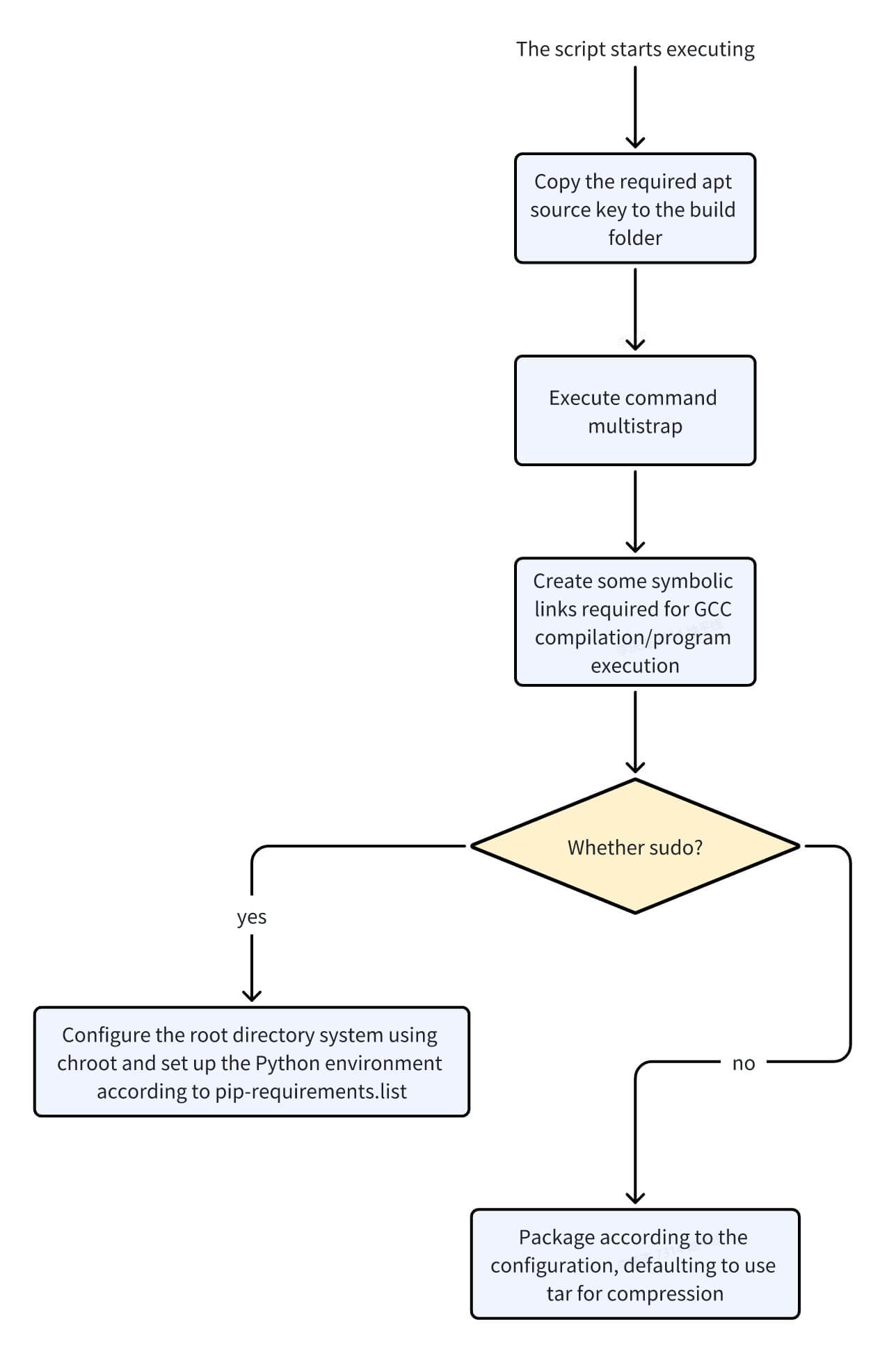
Users generally use the samplefs/make_ubuntu_samplefs.sh script to build the root filesystem. If the script is invoked with sudo, package configuration is included and build time increases significantly.
If the script is invoked without sudo, package configuration is skipped and build time is shorter, but on first boot on the board you must run rm -rf /var/lock/* ; dpkg --configure -a --force-confdef --force-confold ; systemctl enable /etc/systemd/system/S*.service to initialize the system and reboot to ensure normal operation.
It is recommended to use sudo when invoking samplefs/make_ubuntu_samplefs.sh.
The samplefs/make_ubuntu_samplefs.sh script must be run from the samplefs directory.
When invoked without arguments as sudo ./make_ubuntu_samplefs.sh:
The script builds the desktop image by default, using jammy-desktop.conf to build the root filesystem.
The script builds the desktop image by default, using noble-desktop.conf to build the root filesystem.
To specify a configuration file: sudo ./make_ubuntu_samplefs.sh build <config_file_name>. For example, if the new configuration file is new-desktop.conf, run: sudo ./make_ubuntu_samplefs.sh build new-desktop.conf. Place new-desktop.conf under samplefs/configs.
Build flow diagram:
Trimming / Customizing the Root Filesystem
The Priority field in APT sources (deb package control information) affects trimming/customization flow. multistrap installs all packages with Priority "Required" by default. D-Robotics also installs packages marked as important.
Trim/customize only packages whose APT priority is not "important"/"required"
Remove unwanted packages directly from the "packages" fields in samplefs/configs/jammy-base.conf and similar files, or define a new field set and replace the original field set in the "bootstrap" field of the "[General]" field set with your own.
Remove unwanted packages directly from the "packages" fields in samplefs/configs/noble-base.conf and similar files, or define a new field set and replace the original field set in the "bootstrap" field of the "[General]" field set with your own.
Trim/customize packages whose APT priority is "important"/"required"
Note: APT maintainers generally mark the minimum set of packages for a system (each Ubuntu/Debian release) as "Required", but further trimming is possible. When trimming to this extent, users must ensure root filesystem integrity and usability themselves.
Steps:
- Add
omitrequired=truein the[General]field set; - Define all packages to add in
Packages.
7.6.3 RDK deb Package Build Flow
Overview
RDK manages D-Robotics customized user-space features as deb packages by default. Source code for building all customized deb packages is under the SDK source/ directory.
Build Script
The entry script for building deb packages is mk_debs.sh at the SDK root. Use it to build deb packages in the repository.
deb Package Source Directory
Under source, all directories except bootloader, kernel, and hobot-drivers contain source for D-Robotics customized deb packages. Directories such as hobot-spdev, hobot-camera, and hobot-io contain source for corresponding libraries; when mk_debs.sh builds these packages, the source is compiled.
Basic structure of a deb package source directory (using hobot-configs as an example):
hobot-configs/
├── LICENSE          # License for deb package source
├── README.md        # Brief description of the deb package
├── VERSION          # Version in major.minor.patch form; timestamp added at build time by default
└── debian           # Root directory of the deb package, equivalent to root on the board
    ├── DEBIAN       # deb package metadata
    |   ├── postinst # Standard deb script, runs after dpkg copy step during install
    │   ├── postrm   # Standard deb script, runs after dpkg file removal during uninstall
    │   ├── preinst  # Standard deb script, runs before dpkg copy step during install
    │   └── prerm    # Standard deb script, runs before dpkg file removal during uninstall
    ├── etc          # Files to copy into the root filesystem as needed. Paths relative to "debian" map to paths on the root filesystem, e.g. this directory is installed to /etc on the board
    ├── lib          # Files to copy into the root filesystem as needed.
    └── usr          # Files to copy into the root filesystem as needed.
For deb packages that include source code, a source directory is added outside debian, e.g. hobot-camera:
hobot-camera/
├── LICENSE
├── README.md
├── VERSION
├── debian
│   ├── DEBIAN
│   ├── etc
│   └── usr
├── drivers             # Source directory to compile
│   ├── Makefile        # Entry Makefile for compilation
│   ├── deserial        # Source subdirectory
│   ├── inc
│   └── sensor
├── lib -> ../hobot-multimedia/debian/usr/hobot/lib # Symlink for convenient compilation
├── sensor_calibration       # Sensor tuning libraries; examples below, actual set may vary
│   └── lib_imx219_linear.so
└── tuning_tool              # D-Robotics Sensor tuning tool
    ├── bin
    ├── cfg
    ├── control_tool
    ├── res
    └── scripts
Build Flow
For details, refer to the mk_debs.sh implementation. Simplified flow:
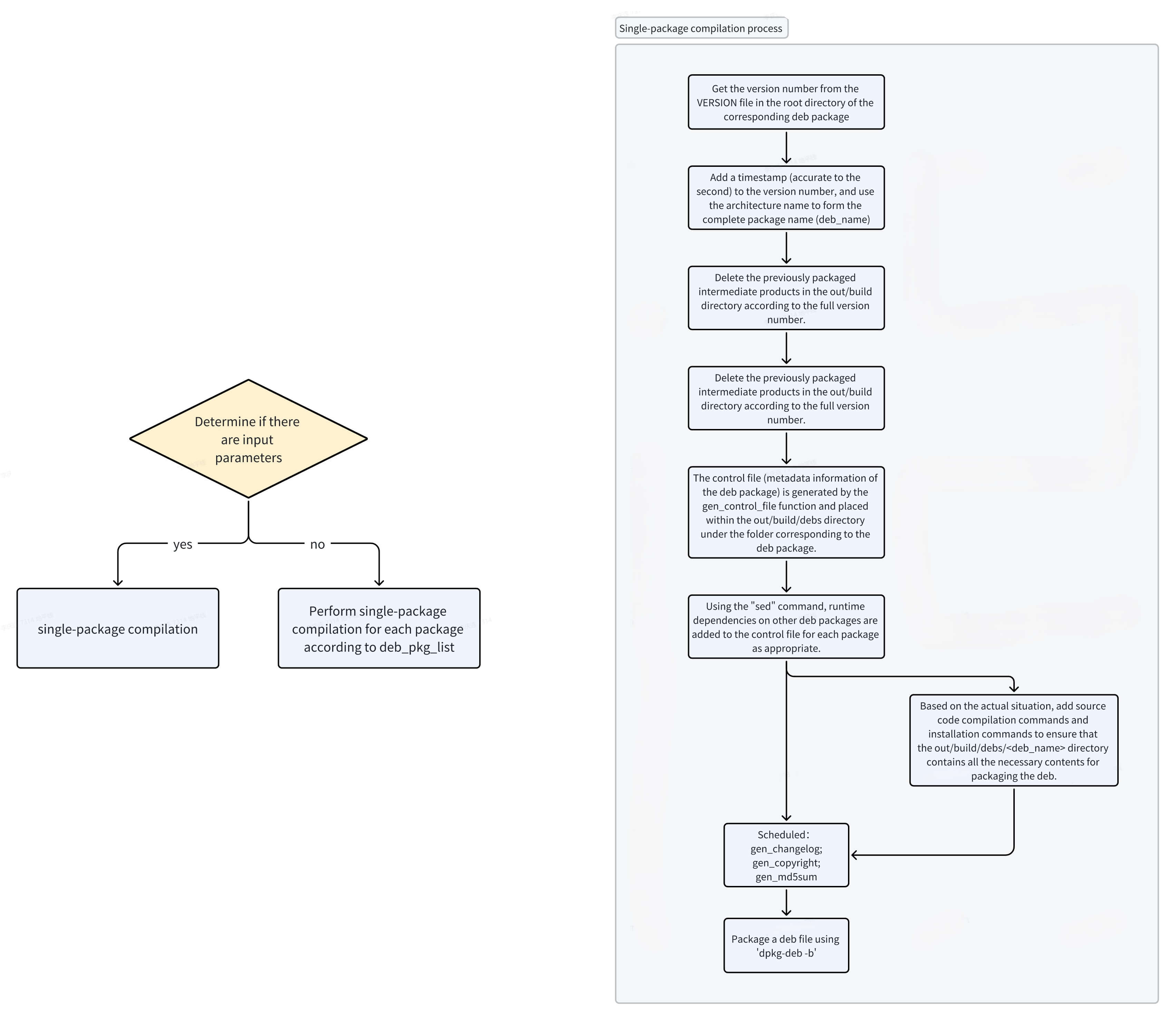
Custom deb Package Flow
- Under
source/, create a folder named after the package name (dpkg package name), e.g. "new_package"; - Under
source/new_package, create adebianfolder with four script files (they may be empty):- preinst: runs before copying files when installing new_package;
- postinst: runs after copy completes when installing new_package;
- prerm: runs before removal when uninstalling new_package;
- postrm: runs after removal when uninstalling new_package.
- To build this package automatically when
mk_debs.shis run without arguments, addnew_packageto thedeb_pkg_listvariable inmk_debs.sh; - In the
switchof themake_debian_debfunction inmk_debs.sh, add acasefornew_package:- Call
gen_control_filein thecaseto generate the control file needed to build the deb; - Use
sedin thecaseto replace the default "depends" field with actual deb dependencies. Ifnew_packagedepends ondep_pkg1anddep_pkg2:- With dependencies:
sed -i 's/Depends: .*$/Depends: dep_pkg1,dep_pkg2/' "${deb_dst_dir}"/DEBIAN/control; - Without dependencies:
sed -i 's/Depends: .*$/Depends: /' "${deb_dst_dir}"/DEBIAN/control;
- With dependencies:
- (Optional) If source must be compiled before packing, invoke compile commands; all output must go under
out/build/debs/new_pkg/debian/; - Set
is_allowed=1
- Call
7.6.4 Including deb Packages in the Image
During image build, deb packages are integrated into the board root filesystem.
Online Image Build
Flow
When pack_image.sh is invoked without the -l option, the online image build flow runs:
- Read the default build config from
DEFAULT_CONFIGinpack_image.sh, e.g. S100:build_params/ubuntu-22.04_desktop_rdk-s100_release.conf, S600:build_params/ubuntu-24.04_desktop_rdk-s600_release.conf;- Override with the
-coption
- Override with the
- Read
RDK_DPKG_DEB_PKG_LISTfrom the build config; - chroot into
out/deploy/rootfs:- Download all deb packages listed in
RDK_DPKG_DEB_PKG_LISTfrom board APT sources; - Install all deb packages;
- Download all deb packages listed in
Adding Extra deb Packages
- Find the package name to install;
- Add the package name to
RDK_DPKG_DEB_PKG_LISTin the chosen build config.
See How to Get Required deb Package Names for finding package names.
Offline Image Build
Flow
When pack_image.sh is invoked with -l, the offline image build flow runs:
- chroot:
- Install each deb package present under
out/product/deb_packages;
- Install each deb package present under
Adding Extra deb Packages
- Find the package name to install;
- Download packages to
out/product/deb_packages:
cd out/product/deb_packages
apt download <package names>
See How to Get Required deb Package Names for finding package names.
How to Get Required deb Package Names
Package names can be obtained in two ways:
- You know the file needed and the host has not installed the package:
- Use search engines (Google/Baidu, etc.) to find the deb package containing the file and its APT source. Example flow:
- Search by filename under "Search the contents of packages" on debian.org;
- After confirming the package name, search on Ubuntu Launchpad for the source; confirm the package exists in jammy/jammy-updates (S100) or noble/noble-updates (S600) main/universe/multiverse components;
- Use search engines (Google/Baidu, etc.) to find the deb package containing the file and its APT source. Example flow:
- You know the file needed and it is installed on the host:
- Use
dpkg -S <filename>to get the package name.
- Use
7.6.5 Custom Partition Guide
RDK S100 partition definitions are under source/bootloader/device/rdk/s100/partition_config_files. Default partition table: source/bootloader/device/rdk/s100/partition_config_files/s100-gpt.json
RDK S600 partition definitions are under source/bootloader/device/rdk/s600/partition_config_files. Default partition table: source/bootloader/device/rdk/s600/partition_config_files/s600-gpt.json
{
	"global": {
		"antirollbackUpdate_host": true,
		"antirollbackUpdate_hsm": false,
		"ab_sync": false,
		"backup_dir": "/tmp/ota/backup",
		"AB_part_a": "_a",
		"AB_part_b": "_b",
		"BAK_part_bak": "_bak"
	},
	"fpt": "fpt_common",                //------------------//
	"recovery": "recovery_common",      //                  //
	"misc": "misc_common",              //                  //
	"HB_APDP":"HB_APDP_common",         //                  //
	"keystorage": "keystorage_common",  //                  //
	"HSM_FW": "HSM_FW_common",          //  miniboot_flash  //
	"HSM_RCA": "HSM_RCA_common",        //                  //
	"keyimage": "keyimage_common",      //                  //
	"SBL": "SBL_common",                //                  //
	"scp": "scp_common",                //                  //
	"spl": "spl_common",                //                  //
	"MCU": "MCU_common",                //------------------//

	"quickboot": "quickboot_common",    //------------------// //------------------//
	"veeprom": "veeprom_common",        //                  // //                  //
	"ubootenv": "ubootenv_common",      //                  // //                  //
	"acore_cfg": "acore_cfg_common",    //   miniboot_emmc  // //                  //
	"bl31": "bl31_common",              //                  // //     emmc_disk    //
	"optee": "optee_common",            //                  // //                  //
	"uboot": "uboot_common",            //------------------// //                  //
	"boot": "boot_common",                                     //                  //
	"ota": "ota_common",                                       //                  //
	"log": "log_common",                                       //                  //
	"userdata": "userdata_common",                             //                  //
	"system": "system_common"                                  //------------------//
}
{
	"global": {
		"antirollbackUpdate_host": true,
		"antirollbackUpdate_hsm": false,
		"ab_sync": false,
		"backup_dir": "/tmp/ota/backup",
		"AB_part_a": "_a",
		"AB_part_b": "_b",
		"BAK_part_bak": "_bak"
	},
	"fpt": "fpt_common",                //------------------//
	"recovery": "recovery_common",      //                  //
	"misc": "misc_common",              //                  //
	"HB_APDP":"HB_APDP_common",         //                  //
	"keystorage": "keystorage_common",  //                  //
	"HSM_FW": "HSM_FW_common",          //  miniboot_flash  //
	"HSM_RCA": "HSM_RCA_common",        //                  //
	"keyimage": "keyimage_common",      //                  //
	"SBL": "SBL_common",                //                  //
	"spl": "spl_common",                //                  //
	"MCU": "MCU_common",                //------------------//

	"quickboot": "quickboot_common",    //------------------// //------------------//
	"veeprom": "veeprom_common",        //                  // //                  //
	"ubootenv": "ubootenv_common",      //                  // //                  //
	"acore_cfg": "acore_cfg_common",    //   miniboot_emmc  // //                  //
	"bl31": "bl31_common",              //                  // //     emmc_disk    //
	"optee": "optee_common",            //                  // //                  //
	"uboot": "uboot_common",            //------------------// //                  //
	"boot": "boot_common",                                     //                  //
	"ota": "ota_common",                                       //                  //
	"log": "log_common",                                       //                  //
	"userdata": "userdata_common",                             //                  //
	"system": "system_common"                                  //------------------//
}
Default Images and Partitions
- miniboot_flash: basic boot images on RDK Nor Flash, including HSM/MCU0 and other system components;
- miniboot_emmc: basic boot images on RDK eMMC, including BL31/Uboot and other system components;
- emmc_disk: full image on RDK eMMC, includes miniboot_emmc; at build time it is converted to Android Sparse image format (Android Sparse image format (third-party reference)) to reduce storage use;
Configuration File Description
The partition table has global shared settings and per-partition settings. Global settings are in the "global" field and apply to all partitions. Supported global parameters:
antirollbackUpdate_host: whether to update host anti-rollback version, true or false;antirollbackUpdate_hsm: whether to update HSM anti-rollback version, true or false;ab_sync: D-Robotics internal reserved field;backup_dir: HSM backup directory;AB_part_a: suffix for A partition in AB layout;AB_part_b: suffix for B partition in AB layout;BAK_part_bak: backup partition suffix;
Per-partition configuration uses "partition name":"partition config type". Choose the config type as needed. For example, for the boot partition, add boot in the global partition config, then create boot.json under the corresponding sub_config folder and define boot_common:
Create boot.json under source/bootloader/device/rdk/s100/partition_config_files/sub_config:
Create boot.json under source/bootloader/device/rdk/s600/partition_config_files/sub_config:
{
	"boot_common": {
		"components":[
			"${TARGET_DEPLOY_DIR}/rootfs/boot/:60m"
		],
		"pre_cmd": [
			"pack_boot.sh;[ $? -ne 0 ] && exit 1;rm -rf ${TARGET_DEPLOY_DIR}/rootfs/boot/System.map*"
		],
		"post_cmd": [
			"pack_avb_img.sh boot boot"
		],
		"fs_type": "ext4",
		"medium": "emmc",
		"ota_is_update": false,
		"ota_update_mode": "image",
		"part_type": "AB",
		"part_type_guid": "C12A7328-F81F-11D2-BA4B-00A0C93EC93B",
		"size": "60m"
	},
	"boot_ota": {
		"components":[
			"${TARGET_DEPLOY_DIR}/rootfs/boot/:60m"
		],
		"pre_cmd": [
			"pack_boot.sh;[ $? -ne 0 ] && exit 1;rm -rf ${TARGET_DEPLOY_DIR}/rootfs/boot/System.map*"
		],
		"post_cmd": [
			"pack_avb_img.sh boot boot"
		],
		"fs_type": "ext4",
		"medium": "emmc",
		"ota_is_update": true,
		"ota_update_mode": "image",
		"part_type": "AB",
		"part_type_guid": "C12A7328-F81F-11D2-BA4B-00A0C93EC93B",
		"size": "60m"
	}
}
Supported partition parameters:
depends: partition dependencies; list partition names that must be built before this partition;components: content for this partition: sub-image paths or directories; directories become filesystems (ext4 or fat16 supported). Use ":" after the path for size in the partition. Multiple sub-images allowed; place under out/xxx/deploy in the partition directory;components_nose: non-secure boot image components;pre_cmd: commands before building the image from components;post_cmd: commands after building the image from components;fs_type: image type: None/ext4/fat16/misc;medium: storage: emmc/nor;ota_is_update: include in full OTA package;ota_update_mode: OTA upgrade mode; image (default) or image_diff for differential;is_rootfs: whether this is the rootfs partition;part_type: AB, BAK, or PERMANENT;size: partition size; units k, m, g;magic: partition magic (flash images with header only);have_anti_ver: whether image contains anti-rollback version, true or false;load_addr: load address (flash images with header only);entry_addr: entry address (flash images with header only);nose_support: non-secure boot image support;
- Partition order in the JSON file is the actual order on the board;
- Partition size must be aligned to the sector size of the storage medium;
Modifying Partitions
RDK S100 supports changing partitions on eMMC/UFS by adding, removing, or editing partition fields. For flash partitions, contact D-Robotics if changes are needed.
RDK S600 supports changing partitions on eMMC/UFS by adding, removing, or editing partition fields. For flash partitions, contact D-Robotics if changes are needed.
- In the partition table, partitions through
logare boot partitions; modifying them is not recommended in principle. - Other partitions such as
userdataandsystemcan be resized freely. If you add partitions, updatefstabso they mount correctly;
After modifying the partition table, apply changes as follows:
- Build the hobot-miniboot deb package:
# In RDK Source Root Directory
./mk_debs.sh hobot-miniboot - Build the image locally:
# In RDK Source Root Directory
sudo ./pack_image.sh -l
7.6.6 eMMC/UFS/NVMe Image Build Notes
Using D-Robotics ubuntu-22.04_desktop_rdk-s100_XXX.conf
For eMMC, UFS, and NVMe, drivers are selected via different config variables. Before building, set the build config to match your storage.
S100 example — edit both:
- /build_params/ubuntu-22.04_desktop_rdk-s100_beta.conf
- /build_params/ubuntu-22.04_desktop_rdk-s100_release.conf
Set RDK_DISK_MEDIUM to the storage type in use:
# eMMC
export RDK_DISK_MEDIUM="emmc"

# UFS
export RDK_DISK_MEDIUM="ufs"

# NVMe
export RDK_DISK_MEDIUM="nvme"
Using Your Own conf File
If you write your own conf file:
- Include
RDK_DISK_MEDIUMand set it to the storage type in use:
# eMMC
export RDK_DISK_MEDIUM="emmc"

# UFS
export RDK_DISK_MEDIUM="ufs"

# NVMe
export RDK_DISK_MEDIUM="nvme"
- Update five places in the S100 build system that reference the conf file (release example):
download_deb_packages.sh:
DEFAULT_CONFIG="${HR_LOCAL_DIR}/build_params/ubuntu-22.04_desktop_rdk-s100_release.conf"
download_samplefs.sh:
DEFAULT_CONFIG="${HR_LOCAL_DIR}/build_params/ubuntu-22.04_desktop_rdk-s100_release.conf"
mk_kernel.sh:
DEFAULT_CONFIG="${HR_LOCAL_DIR}/build_params/ubuntu-22.04_desktop_rdk-s100_release.conf"
pack_image.sh:
DEFAULT_CONFIG="${HR_LOCAL_DIR}/build_params/ubuntu-22.04_desktop_rdk-s100_release.conf"
mk_uboot.sh:
DEFAULT_CONFIG="${HR_LOCAL_DIR}/../../build_params/ubuntu-22.04_desktop_rdk-s100_release.conf"
Build Flow After conf Changes
After changes, build uboot/spl, update miniboot/bootloader, and run a full build:
# From source root, build hobot-miniboot deb
./mk_debs.sh hobot-miniboot # Output: out/product/deb_packages/hobot-miniboot_4.0.Z-xxx_arm64.deb

# Build disk image
sudo ./pack_image.sh -l  # -l uses local deb packages; without -l, remote packages are used
- NVMe boot is supported on RDK S100 V0P6 and later; set [D13:D12] to [1:0] on the board
- miniboot_flash built in NVMe mode supports NVMe boot only; miniboot_flash built in eMMC/UFS mode also supports NVMe boot
- Flash tool 1.1.10 and later supports NVMe image flashing