Time Synchronization Solution
Abbreviations and Explanations
| Abbreviation | Explanation |
|---|---|
| GPS | Global Positioning System |
| RTC | Real_Time Clock |
| PHC | PTP hardware clock |
| PTP | precision time protocol |
| gPTP | precision time protocol, extension of PTP Protocol |
| MCU | Microcontroller Unit |
| UART | Universal Asynchronous Receiver/Transmitter |
| CAN | Controller Area Network |
| PPS | Pulse Per Second |
| NMEA | National Marine Electronics Association |
| NTP | Network Time Protocol |
| NIC | Network Interface Card |
ptp time synchronization
Function
This software includes two programs: ptp4l and phc2sys. When used together, these two programs can achieve obtaining time from the master, synchronizing the PHC time of S100 and the Linux system time.
ptp4l usage
Command line parameters
ptp4l supports gptp functionality and can act as either a master or a slave; if acting as a slave, it can obtain time from the master and synchronize the PHC time and RTC time of S100.
You can view the help information via ptp4l -h:
  root@ubuntu:/userdata# ptp4l -h

  usage: ptp4l [options]

  Delay Mechanism

  -A Auto, starting with E2E
  -E E2E, delay request-response (default)
  -P P2P, peer delay mechanism

  Network Transport

  -2 IEEE 802.3
  -4 UDP IPV4 (default)
  -6 UDP IPV6

  Time Stamping

  -H HARDWARE (default)
  -S SOFTWARE
  -L LEGACY HW

  Other Options

  -f [file] read configuration from 'file'
  -i [dev] interface device to use, for example 'eth0'
  (may be specified multiple times)
  -p [dev] Clock device to use, default auto
  (ignored for SOFTWARE/LEGACY HW time stamping)
  -s slave only mode (overrides configuration file)
  -l [num] set the logging level to 'num'
  -m print messages to stdout
  -q do not print messages to the syslog
  -v prints the software version and exits
  -h prints this message and exits
Use of configuration files
ptp4l can specify a configuration file via the -f parameter.
Configuration files are divided into sections; empty lines and lines starting with # are ignored.
There are three section types:
The [global] section is used to configure program options, clock options, and default port options.
Port sections use the name of the configured network interface, such as the [eth0] section, and the options configured here will override the default port options in the [global] section. A port section can be empty, its function is just to specify the network interface, so that the -i option does not need to be used on the command line.
The [unicast_master_table] section is used to configure the unicast table.
For detailed information on the configuration file, please refer to: https://linuxptp.nwtime.org/documentation/ptp4l/
automotive configuration examples
automotive-master.cfg:
#
# Automotive Profile example configuration for master containing those
# attributes which differ from the defaults.  See the file, default.cfg, for
# the complete list of available options.
#
[global]
# Options carried over from gPTP.
gmCapable       1
priority1       248
priority2       248
logSyncInterval     -3
syncReceiptTimeout  3
neighborPropDelayThresh 800
min_neighbor_prop_delay -20000000
assume_two_step     1
path_trace_enabled  1
follow_up_info      1
transportSpecific   0x1
ptp_dst_mac     01:80:C2:00:00:0E
network_transport   L2
delay_mechanism     P2P
#
# Automotive Profile specific options
#
BMCA            noop
masterOnly      1
inhibit_announce    1
asCapable               true
inhibit_delay_req       1
automotive-slave.cfg:
#
# Automotive Profile example configuration for slaves containing those
# attributes which differ from the defaults.  See the file, default.cfg, for
# the complete list of available options.
#
[global]
#
# Options carried over from gPTP.
#
gmCapable       1
priority1       248
priority2       248
logSyncInterval     -3
syncReceiptTimeout  3
neighborPropDelayThresh 800
min_neighbor_prop_delay -20000000
assume_two_step     1
path_trace_enabled  1
follow_up_info      1
transportSpecific   0x1
ptp_dst_mac     01:80:C2:00:00:0E
network_transport   L2
delay_mechanism     P2P
#
# Automotive Profile specific options
#
BMCA            noop
slaveOnly       1
inhibit_announce    1
asCapable               true
ignore_source_id    1
# Required to quickly correct Time Jumps in master
step_threshold          1
operLogSyncInterval     0
operLogPdelayReqInterval 2
msg_interval_request     1
servo_offset_threshold   30
servo_num_offset_values  10
phc2sys usage
phc2sys is used to synchronize the Linux system time to the PHC time, or to synchronize the PHC time to the Linux system time.
You can view the usage instructions via phc2sys --h:
  root@ubuntu:/userdata# phc2sys -h

  usage: phc2sys [options]


  automatic configuration:
  -a turn on autoconfiguration
  -r synchronize system (realtime) clock
  repeat -r to consider it also as a time source
  manual configuration:
  -c [dev|name] slave clock (CLOCK_REALTIME)
  -d [dev] master PPS device
  -s [dev|name] master clock
  -O [offset] slave-master time offset (0)
  -w wait for ptp4l
  common options:
  -f [file] configuration file
  -E [pi|linreg] clock servo (pi)
  -P [kp] proportional constant (0.7)
  -I [ki] integration constant (0.3)
  -S [step] step threshold (disabled)
  -F [step] step threshold only on start (0.00002)
  -R [rate] slave clock update rate in HZ (1.0)
  -N [num] number of master clock readings per update (5)
  -L [limit] sanity frequency limit in ppb (200000000)
  -M [num] NTP SHM segment number (0)
  -u [num] number of clock updates in summary stats (0)
  -n [num] domain number (0)
  -x apply leap seconds by servo instead of kernel
  -z [path] server address for UDS (/var/run/ptp4l)
  -l [num] set the logging level to 'num' (6)
  -t [tag] add tag to log messages
  -m print messages to stdout
  -q do not print messages to the syslog
  -v prints the software version and exits
  -h prints this message and exits
Comprehensive example
Command line parameters
The following demonstrates how to use ptp4l and phc2sys to synchronize the master's network card time to the slave's network card time and system time. Users need to ensure network connectivity between the master device and the slave device.
Execute the following commands on the Master side:
ptp4l -i eth0 -f /usr/hobot/lib/pkgconfig/automotive-master.cfg -m -l 7
Execute the following commands on the Slave side:
  ptp4l -i eth0 -f /usr/hobot/lib/pkgconfig/automotive-slave.cfg -m -l 7 > ptp4l.log &
  phc2sys -s eth0 -c CLOCK_REALTIME --transportSpecific=1 -m --step_threshold=1000 -w > phc2sys.log &
Log example
Slave side log:
  ptp4l[8330.884]: PI servo: sync interval 1.000 kp 0.700 ki 0.300000
  ptp4l[8330.885]: master offset 21 s3 freq -391 path delay 690
  ptp4l[8330.998]: port 1: delay timeout
  ptp4l[8330.999]: delay filtered 689 raw 687
  ptp4l[8331.884]: master offset 35 s3 freq -371 path delay 689
  ptp4l[8332.885]: master offset 47 s3 freq -349 path delay 689
  ptp4l[8333.885]: master offset 50 s3 freq -332 path delay 689
  ptp4l[8334.885]: master offset 22 s3 freq -345 path delay 689
Master side log:
  ptp4l[3469.136]: config item /var/run/ptp4l.inhibit_delay_req is 1
  ptp4l[3469.136]: config item (null).uds_address is '/var/run/ptp4l'
  ptp4l[3469.136]: port 0: INITIALIZING to LISTENING on INIT_COMPLETE
  ptp4l[3469.136]: config item (null).slaveOnly is 0
  ptp4l[3469.136]: port 1: received link status notification
  ptp4l[3469.136]: interface index 2 is up
  ptp4l[3469.261]: port 1: master sync timeout
  ptp4l[3469.386]: port 1: master sync timeout
  ptp4l[3469.511]: port 1: master sync timeout
  ptp4l[3469.636]: port 1: master sync timeout
  ptp4l[3469.761]: port 1: master sync timeout
  ptp4l[3469.886]: port 1: master sync timeout
ptp time synchronization solution
Due to hardware feature limitations, the driver implementation cannot support both E2E/P2P simultaneously. S100 defaults to using the P2P delay measurement mechanism.
Due to hardware feature limitations, the driver implementation cannot support both E2E/P2P simultaneously. S600 defaults to using the P2P delay measurement mechanism.
When using the ptp time synchronization solution, for example, if the radar acts as a ptp4l slave and does not support the P2P protocol, and the E2E protocol needs to be used, testing can be performed with the following modification:
The following modification is only effective when the SoC acts as the ptp4l master. This modification will affect the functionality when the SoC acts as a ptp4l slave!
  diff --git a/ethernet/hobot/hobot_eth_super_ptp.c b/ethernet/hobot/hobot_eth_super_ptp.c
  index 0bfe2250..60577ea4 100755
  --- a/ethernet/hobot/hobot_eth_super_ptp.c
  +++ b/ethernet/hobot/hobot_eth_super_ptp.c
  @@ -238,6 +238,7 @@ static void ptp_hwtstamp_ctr_config(struct hwtstamp_config *config, struct hwtst
                          break;
                  case (s32)HWTSTAMP_FILTER_PTP_V2_EVENT:
                          ctr_config->ptp_v2 = (u32)PTP_TCR_TSVER2ENA;
  +                       ctr_config->ts_master_en = (u32)PTP_TCR_TSMSTRENA;
                          ctr_config->snap_type_sel = PTP_GMAC4_TCR_SNAPTYPSEL_1;/*PRQA S 1882, 0478, 0636, 4501*/
                          ctr_config->ptp_over_ipv4_udp = (u32)PTP_TCR_TSIPV4ENA;
                          ctr_config->ptp_over_ipv6_udp = (u32)PTP_TCR_TSIPV6ENA;
Global time source configuration
Since there are multiple timelines in the current system, such as systime, phc, rtc, etc., and each module can choose different timelines to print their respective timestamps, in order to unify the timeline of timestamps in the logs of each module, an hb_systime module has been added to unify the timeline selection across system modules. The specific functions implemented by this module are as follows:
Parse the default timeline configuration in the dts, as follows:
  globaltime: globaltime {
    compatible = "hobot,globaltime";
    globaltime = <2>; /* 0-systime, 1-phc, 2-rtc */
    phc-index = <0>; /* phc index */
    status = "okay";
  };
The globaltime attribute in the dts indicates the default global timeline used by the system. S100 uses RTC time by default. The mapping is as follows:
  0:systime
  1:phc
  2:rtc
If the timeline selects the network card phc time, the phc-index attribute further determines which network card's phc time is currently used. The mapping is as follows:
  0:phc0
  1:phc1
Provide /sys interface to the application layer to set or get the current system-wide timeline selection. The commands are as follows:
View the current system-wide timeline configuration:
cat /sys/devices/platform/soc/soc:globaltime/globaltime
Set the system-wide timeline option:
  echo 0 >/sys/devices/platform/soc/soc:globaltime/globaltime
  or
  echo 1 >/sys/devices/platform/soc/soc:globaltime/globaltime
  or
  echo 2 >/sys/devices/platform/soc/soc:globaltime/globaltime
Provide /sys interface to the application layer to set or get the currently selected phc index.
View the currently selected phc index:
cat /sys/devices/platform/soc/soc:globaltime/phcindex
Set the phc index:
  echo 0 >/sys/devices/platform/soc/soc:globaltime/phcindex
  or
  echo 1 >/sys/devices/platform/soc/soc:globaltime/phcindex
📍 Note: The phcindex setting should not exceed the actual number of network cards.
Provide interfaces to other kernel modules to check which timeline is currently used by the system and which phc is used, as follows:
  int32_t hobot_get_global_time_type(uint32_t *global_time_type);
  int32_t hobot_get_phc_index(uint32_t *phc_index);
MCU time synchronization explanation
Time types supported by MCU
PHC time: This is a timer inside the network card;
RTC time: This is a real-time clock on the MCU side, which does not support power supply via a coin cell battery;
Time synchronization methods supported by MCU
The MCU supports the following time synchronization methods:
PPS-based Timesync: Captures snapshots of two times on the rising edge of the second pulse, calculates the error based on the snapshots, and performs time synchronization based on the error;
PPS-based Timesync
Code directory: mcu/Service/TimeSync/src/
Supported time
- RTC
- PHC
Configuration method
Determine which time synchronization method to use by modifying the configuration. The configuration code is in the ./Service/TimeSync/src/Hobot_TimeSync.c file. Currently, only the following time synchronization method is supported:
PHC synchronizes RTC
  /*TimeSync Config Begin*/
  uint8 ConfigSource[] = {
    TIMEKEEPER_NONE, //TimeKeeperRTC Source
    TIMEKEEPER_NONE, //TimeKeeperGPS Source
    TIMEKEEPER_NONE, //TimeKeeperStbmPhc Source //Not Used in S100
    TIMEKEEPER_NONE, //TimeKeeperSpi Source
    TIMEKEEPER_NONE, //TimeKeeperIPC Source
    TIMEKEEPER_NONE, //TimeKeeperPHC Source
    TIMEKEEPER_NONE //TimeKeeperGpt Source //Not Used in S100
  };

  _Bool EnableTimeKeeper[] = {
    FALSE,//TimeKeeperRTC
    FALSE,//TimeKeeperGPS
    FALSE,//TimeKeeperStbmPhc //Not Used in S100
    FALSE,//TimeKeeperSpi
    FALSE,//TimeKeeperIPC
    FALSE,//TimeKeeperPHC
    FALSE//TimeKeeperGpt //Not Used in S100
  };

  _Bool Enable_TimeSync_RTC_Once= FALSE;

  _Bool Enable_HobotTimesync_Debug = FALSE;
  _Bool EthTsync_Master_Use_Phc = TRUE;
  uint8 TimeSync_PPS_Index = TIMESYNC_MCU_ETH0_PPS;

  /*TimeSync Config End*/
ConfigSource: Configure the time source for each time. If a time does not need to be synchronized with other times, configure the time source as TIMEKEEPER_NONE.
The configurable time sources are:
  typedef enum TimeKeeperIndexEnum {
    TIMEKEEPER_RTC_INDEX,
    TIMEKEEPER_GPS_INDEX,
    TIMEKEEPER_STBMPHC_INDEX, //Not Used in S100
    TIMEKEEPER_SPI_INDEX,
    TIMEKEEPER_IPC_INDEX,
    TIMEKEEPER_PHC_INDEX,
    TIMEKEEPER_STBMGPT_INDEX, //Not Used in S100
    TIMEKEEPER_NONE,
    TIMEKEEPER_NUM_MAX,
  } TimeKeeperIndex;
EnableTimeKeeper: Configure whether the time is enabled;
Enable_HobotTimesync_Debug: Configure whether to enable printing;
TimeSync_PPS_Index: Configure which PPS to use for time synchronization. The available PPS options are as follows:
  #define TIMESYNC_AON_RTC_PPS 0
  #define TIMESYNC_PPS0 2
  #define TIMESYNC_PPS1 3
  #define TIMESYNC_PPS2 4
  #define TIMESYNC_PCIE0_PTM_PPS 6
  #define TIMESYNC_PCIE1_PTM_PPS 7
  #define TIMESYNC_ACORE_ETH0_PPS 8
  #define TIMESYNC_ACORE_ETH1_PPS 9
  #define TIMESYNC_MCU_ETH0_PPS 10
  #define TIMESYNC_PPS_DISABLE 11
Configuration example
If you want to configure RTC and GPS for time synchronization, the configuration is as follows:
  /*TimeSync Config Begin*/
  uint8 ConfigSource[] = {
    TIMEKEEPER_GPS_INDEX, //TimeKeeperRTC Source
    TIMEKEEPER_NONE, //TimeKeeperGPS Source
    TIMEKEEPER_NONE, //TimeKeeperStbmPhc Source //Not Used in S100
    TIMEKEEPER_NONE, //TimeKeeperSpi Source
    TIMEKEEPER_NONE, //TimeKeeperIPC Source
    TIMEKEEPER_NONE, //TimeKeeperPHC Source
    TIMEKEEPER_NONE //TimeKeeperGpt Source //Not Used in S100
  };

  _Bool EnableTimeKeeper[] = {
    TRUE,//TimeKeeperRTC
    TRUE,//TimeKeeperGPS
    FALSE,//TimeKeeperStbmPhc //Not Used in S100
    FALSE,//TimeKeeperSpi
    FALSE,//TimeKeeperIPC
    FALSE,//TimeKeeperPHC
    FALSE//TimeKeeperGpt //Not Used in S100
  };

  _Bool Enable_TimeSync_RTC_Once= FALSE;

  _Bool Enable_HobotTimesync_Debug = FALSE;
  /*TimeSync Config End*/
PPS Explanation
S100 PPS Introduction
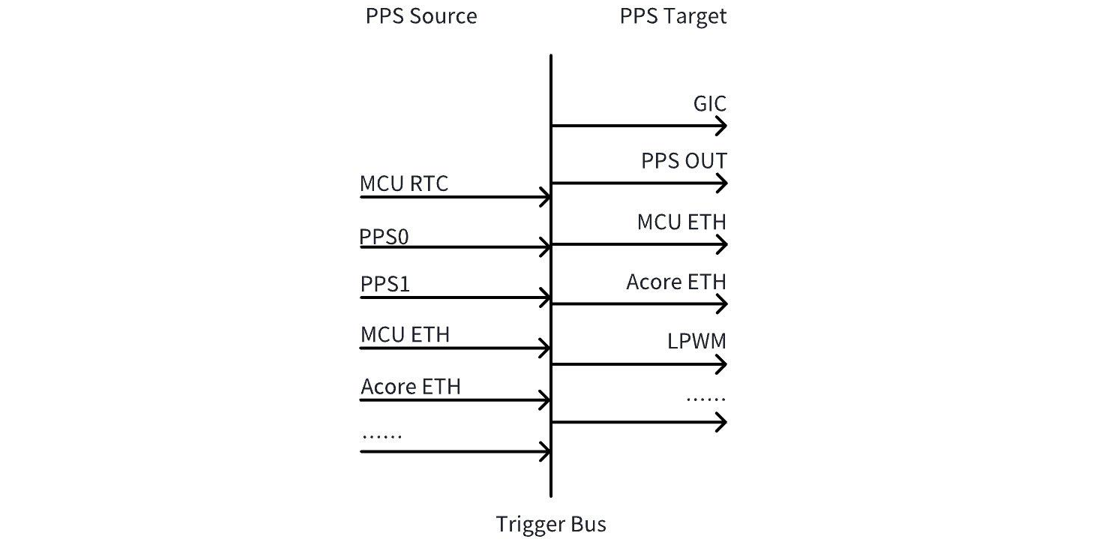
As shown in the figure above, PPS can be divided into PPS Source and PPS Target. The PPS Source generates PPS, which is sent to the PPS Target via the intermediate Trigger Bus. The PPS Target uses the incoming PPS to generate snapshots or LPWM waveforms.
PPS Target
PPS Target refers to the object triggered by PPS, used to generate snapshots or LPWM waveforms. The main objects currently triggered using PPS are as follows:
PPS OUT: The PPS2 pin is multiplexed and set to PPS OUT by default in the current software version, meaning this pad pin can output the PPS from inside the chip to the outside;
GIC: The current software version defaults to routing interrupts from MCU RTC, PPS0, PPS1, PPS2, and MCU ETH PPS to the GIC;
Acore ETH: Acore ETH can accept a PPS source and use the PPS to take hardware snapshot times of itself;
LPWM: LPWM can accept a PPS source input and use the PPS to generate corresponding LPWM waveforms;
PPS Source
There are multiple optional PPS sources. The commonly used ones are as follows; the others are reserved:
Index 0: MCU RTC PPS, which is the PPS output by the RTC on the MCU side. The current software version has output by default, with a cycle of once per second;
Index 2: PPS0, a PPS pad, can be used for external PPS source input, such as GPS PPS, into the chip;
Index 3: PPS1, a PPS pad, can be used for external PPS source input, such as GPS PPS, into the chip;
Index 4: PPS2, a PPS pad, can be used for external PPS source input, such as GPS PPS, into the chip, or for outputting the internal PPS to the outside;
Index 8: Acore Eth0 PPS, which is the PPS generated by Acore Eth0; flexible time periods can be set, such as once per second, once every 400 milliseconds, etc.;
Index 9: Acore Eth1 PPS, which is the PPS generated by Acore Eth1; flexible time periods can be set, such as once per second, once every 400 milliseconds, etc.;
Index 10: MCU Eth PPS, which is the PPS output by the Eth on the MCU side. The current software version has output by default, with a cycle of once per second;
PPS PAD Configuration
The current software version defaults to setting PPS0 and PPS1 as PPS IN, i.e., for receiving external PPS input like GPS PPS; it sets PPS2 as PPS OUT, i.e., outputting the chip's PPS to the outside; All these configurations are done by the Port module on the MCU side. If modifications are needed, make them in the Port module.
Take configuring the PPS2 pin as output to output the chip's ETH PPS to the outside as an example to illustrate the modification method:
- Modify the default pps_source of the Port configuration to ETH PPS
 static const Port_Lld_PpsConfigType PpsConfig =
 {
     (boolean)TRUE,
-    PPS_SOURCE_AON_RTC,
+    PPS_SOURCE_ETH0_PTP,
 };
- Configure the pin as PPS_OUT func
-    {(uint8)2, "PPS_OUT", (boolean)TRUE, {(boolean)TRUE, (boolean)FALSE, (boolean)TRUE, (boolean)TRUE, (boolean)TRUE, GPIO, PORT_PIN_CONFIG_TYPE0, PORT_PULL_NONE, PORT_DRIVE_DEFAULT, PORT_PIN_DIR_OUT, PORT_PIN_LEVEL_HIGH}},
+    {(uint8)2, "PPS_OUT", (boolean)TRUE, {(boolean)TRUE, (boolean)FALSE, (boolean)TRUE, (boolean)TRUE, (boolean)TRUE, PPS_OUT, PORT_PIN_CONFIG_TYPE0, PORT_PULL_NONE, PORT_DRIVE_DEFAULT, PORT_PIN_DIR_OUT, PORT_PIN_LEVEL_HIGH}},
The above is implemented by modifying McalCdd/gen_s100_sip_B/Port/src/Port_PBcfg.c. After modification, update the MCU firmware.
- Modify the default pps_source of the Port configuration to ETH PPS
 static const Port_Lld_PpsConfigType PpsConfig =
 {
     (boolean)TRUE,
-    PPS_SOURCE_AON_RTC,
+    PPS_SOURCE_ETH0_PTP,
 };
- On S600, the default function of the PIN pin is PPS OUT FUNC, so no modification is needed.
The above is implemented by modifying McalCdd/gen_s600_md/Port/src/Port_PBcfg.c. After modification, update the MCU firmware.
Acore Eth PPS Introduction
Acore Eth PPS has two output methods: flex mode and fixed mode. The default on power-up is fixed mode. It can be set to flex mode using the ethtool command described below. To reset to fixed mode, restart the network card or reboot the system.
flex mode: A flexible PPS mode where its start/end time, period, and duty cycle can all be flexibly configured. Its rising edge is at the integer second moment, and the PPS output does not change with changes in PHC time. In the current software version, its duty cycle is 1%, and the period can be flexibly configured according to the method below. Common periods are 1s and 400ms.
fixed mode: A fixed PPS mode with a fixed period and a fixed duty cycle of 46.3129%. The PPS output changes with changes in PHC time. In the current software version, it supports a 1s period. The integer second moment of the waveform is the falling edge, which outputs a high level of 463.129ms after a low level of 536.871ms.
Configuration method for integer second output requirements:
If there is a requirement to output PPS at the integer second moment in flex mode, configure the PPS output after gptp time synchronization is complete.
If there is a requirement to output PPS at the integer second moment in fixed mode, note that the integer second moment of ETH occurs at the falling edge, while LPWM is synchronized by the rising edge of ETH. Therefore, adjust the offset of LPWM as shown in the figure below. For example, for a camera at 30 frames per second, the PPS rising edge is at 536.871ms, the falling edge is at 1 second exactly. If an image is required at the integer second position, offset = 463.129 modulo 33.333 = 29.8ms.
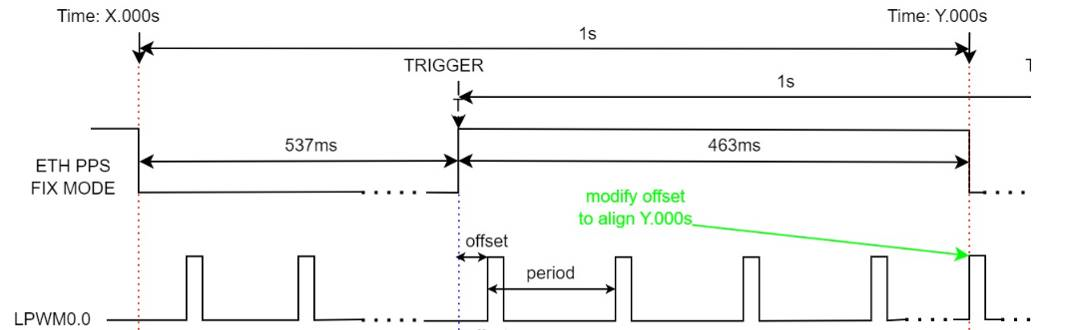
Acore Eth PPS has two output methods: flex mode and fixed mode. The default on power-up is fixed mode. It can be set to flex mode using the ethtool command described below. To reset to fixed mode, restart the network card or reboot the system.
flex mode: A flexible PPS mode where its start/end time, period, and duty cycle can all be flexibly configured. Its rising edge is at the integer second moment, and the PPS output does not change with changes in PHC time. In the current software version, its duty cycle is 1%, and the period can be flexibly configured according to the method below. Common periods are 1s and 400ms.
fixed mode: A fixed PPS mode with a fixed period. S600 adds polarity inversion, so the duty cycle is fixed at 53.6871%. The PPS output changes with changes in PHC time. In the current software version, it supports a 1s period. The integer second moment of the waveform is the rising edge, which outputs a high level of 536.871ms followed by a low level of 463.129ms.
Configuration method for integer second output requirements:
If there is a requirement to output PPS at the integer second moment in flex mode, configure the PPS output after gptp time synchronization is complete.
Acore Eth PPS Output Configuration Method
For Acore Eth PPS output, you can use the ethtool tool with the following command format:
Configure Eth0 PPS output with a 1-second period: ethtool hobot_gmac --set-flex-pps eth0 index 0 fpps on interval 1000000000;
Configure Eth1 PPS output with a 1-second period: ethtool hobot_gmac --set-flex-pps eth1 index 0 fpps on interval 1000000000;
If you need to modify the output period, change the last parameter 1000000000. The unit of this parameter is ns. If you want to change it to 400ms, change it to 400000000.
MCU Eth PPS Configuration Method
The signal period and pulse width of the MCU Eth PPS are set with default values in the configuration file Config/McalCdd/gen_s100_sip_B_mcu1/Ethernet/src/Mac_Ip_PBcfg.c. The default value of PpsInterval is 1000(ms), and the default value of parameter PpsWidth is 10(ms).
The signal period and pulse width of the MCU Eth PPS are set with default values in the configuration file Config/McalCdd/gen_s600_md_mcu1/Ethernet/src/Mac_Ip_PBcfg.c. The default value of PpsInterval is 1000(ms), and the default value of parameter PpsWidth is 10(ms).
Constraints:
- The configuration item EthGlobalTimeSupport needs to be enabled; it is enabled by default.
- The value of parameter PpsWidth must be less than PpsInterval.
After configuration is enabled, check the sys node assert change to confirm whether the PPS configuration is effective.
cat /sys/class/pps/pps[4]/assert
/sys/class/pps contains multiple PPS entries. Identify which PPS corresponds to the MCU PPS via the name.
cat /sys/class/pps/pps[*]/name
Overall Time Synchronization Solution
Function Overview
This chapter mainly uses S100 as an example to introduce the time synchronization solution. Currently, the mainline does not start time synchronization by default. If there is a need to start time synchronization by default, refer to the Operation Guide section for configuration.
Software Architecture Explanation
Single Time Domain Solution for Time Source Accessing Acore
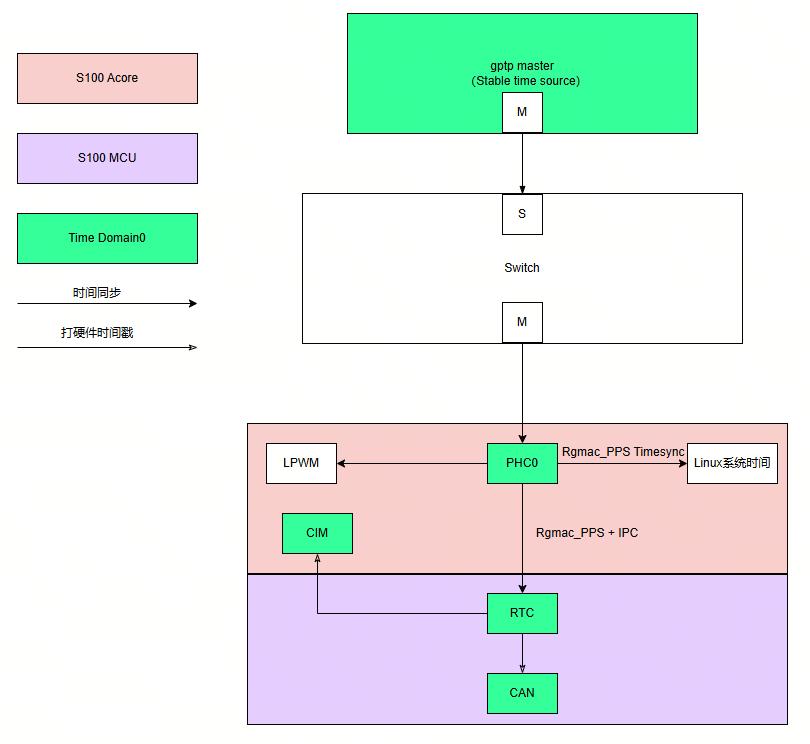
The time synchronization process in the above figure is summarized as follows:
-
The external gptp master device serves as the time source for the entire S100;
-
First, the time of the gptp master is synchronized to the network card on the Acore side via the ptp4l software; then, the network card time is synchronized to the Linux system time via phc2sys. This process continues continuously;
-
Next, the network card time is synchronized to the MCU side Rtc via the Acore timesync_sample software;
Feature description:
-
Rtc supports providing hardware timestamps to CIM and CAN in the figure;
-
The Acore network card can issue PPS to trigger lpwm for exposure synchronization;
Code Location and Directory Structure
The timesync sample code on the Acore side is located in the project directory: {sdk_dir}/source/hobot-sp-samples/debian/app/timesync_demo
The timesync sample code on the MCU side is located in the project directory: {mcu_dir}/mcu/Service/TimeSync
Acore Compilation
Build Environment
After installing the hobot-sp-samples_*.deb package on the board, the timesync_demo source code will be included.
Compilation Instructions
This sample mainly relies on the API header files provided by ipcfhal and timesync
#include "hb_ipcf_hal.h"
#include "hobot_clock_hal.h"
The libraries that the compilation depends on are as follows:
LIBS := -lhbipcfhal -lhbtimesynchal -lpthread -lalog
Compilation command:
Enter the /app/timesync_demo/sample_timesync directory on the board and execute
make
MCU Compilation
Build Environment
The build environment for this sample on the MCU side uses the build tool in the MCU code. Please refer to: MCU Compilation.
Compile the FreeRtos image version. Note:
  # Enter the Build/FreeRtos directory
  python build_freertos.py lite matrix B s100 gcc debug # Hardware board or project name
  python build_freertos.py lite matrix B s600 gcc debug # Hardware board or project name
Running
Supported Platforms
S100/S600
Board Deployment and Configuration
The following preparations need to be made:
Burn the MCU firmware that supports the MCU-side time synchronization service.
If you need to run gptp time synchronization, ensure network connectivity.
To prevent interference from the Linux operating system's built-in time synchronization service, execute the following command to disable the Linux built-in time synchronization service.
systemctl stop systemd-timesyncd
Operation Guide
Single Time Domain Solution for Time Source Accessing Acore
Modify the configuration in the ./Service/TimeSync/src/Hobot_TimeSync.c code on the MCU side as follows:
/* Timesync Config Begin */
uint8_t ConfigSource[] = {
    TIMEKEEPER_IPC_INDEX,   // TimeKeeperRTC Source
    TIMEKEEPER_NONE,        // TimeKeeperGPS Source
    TIMEKEEPER_IPC_INDEX,   // TimeKeeperStbmPhc Source
    TIMEKEEPER_NONE,        // TimeKeeperSpi Source
    TIMEKEEPER_NONE,        // TimeKeeperIPC Source
    TIMEKEEPER_NONE,        // TimeKeeperPHC Source
    TIMEKEEPER_NONE         // TimeKeeperGpt Source
};

_Bool EnableTimeKeeper[] = {
    TRUE,
    FALSE,
    FALSE,
    FALSE,
    TRUE,
    FALSE,
    FALSE
};

_Bool Enable_TimeSync_RTC_Once = FALSE;

_Bool Enable_HobotTimesync_Debug = TRUE;
When modifying the MCU side, pay attention to the impact of the PRODUCT_IMAGE macro. Refer to the notes section above for details.
After burning and starting, the MCU executes the following commands by default. The first command specifies the PPS trigger source as mcu eth; the second command starts the time synchronization service.
  TimeSyncCtrl 4 10
  TimeSyncCtrl 6
The command to enable MCU side log printing is as follows:
TimeSyncCtrl 1
The MCU does not start the time synchronization service by default. If you want to configure default startup, in addition to modifying the configurations described above, you also need to add initialization actions, as shown below:
TASK(OsTask_SysCore_Startup)
{
  ......
  Timesync_Init();
  ......
}
After completing the above configuration, upon loading the MCU1 firmware, the time synchronization service will start by default, and the TimeSyncCtrl command will no longer be needed.
Execute the following commands on Acore. The first command sets the log level to allow output to the console; the second command starts ptp time synchronization, synchronizing the external ptp master time to the Acore network card; The third command synchronizes the network card time to the Linux system time; the fifth command starts the time synchronization program, synchronizing the Acore network card time to the MCU side Rtc.
export LOGLEVEL=15
ptp4l -i eth0 -f /usr/hobot/lib/pkgconfig/automotive-slave.cfg -m -l 7 > ptp4l.log &
phc2sys -s eth0 -c CLOCK_REALTIME --transportSpecific=1 -m --step_threshold=1000 -w > phc2sys.log &
cd /app/timesync_demo/sample_timesync
./timesync_sample -p 0 -P 4 -r
Key parameter descriptions:
-p 1: Synchronize network card 1 time; -p 0: Synchronize network card 0 time (default)
-r: Synchronize Acore network card time to MCU Rtc time
Acore time synchronization log is as follows:
[INFO][][/app/timesync_demo/sample_timesync/timesync_sample.c:510] ************************************************
[INFO][][/app/timesync_demo/sample_timesync/timesync_sample.c:517] Monotonic_raw time: second = 222, nanosecond = 557846725
[INFO][][/app/timesync_demo/sample_timesync/timesync_sample.c:520] PPS fetch infobuf time: second = 1745925136, nanosecond = 454616475
[INFO][][/app/timesync_demo/sample_timesync/timesync_sample.c:531] rtc snapshot: sec = 1745925136, nsec = 455389596
[INFO][][/app/timesync_demo/sample_timesync/timesync_sample.c:538] ptp0 snapshot: sec = 1745925136, nsec = 455462040
[INFO][][/app/timesync_demo/sample_timesync/timesync_sample.c:582] Timesync Info: timesync ipc send data succeed
[INFO][][/app/timesync_demo/sample_timesync/timesync_sample.c:510] ************************************************
Acore log description:
The "snapshot" field indicates the hardware timestamps corresponding to each clock when the MCU network card issues the PPS second pulse;
The "PPS fetch infobuf time" field indicates the system time captured by the Acore PPS driver;
The "timesync ipc send data succeed" message indicates that the Acore network card timestamp was successfully sent to the MCU, where time synchronization is performed. The quality of time synchronization can be viewed on the MCU side.
MCU time synchronization log is as follows:
[0162.799758 0]*
[0162.802970 0]RTC snapshot time:1745925071.455114934
[0163.000408 0]Timesync_RecvCallback.
[0163.000661 0]Get Time From Acore success 1745925071 455188935
[0163.001958 0]TimeKeeperRTC and TimeKeeperIPC Offset : - 0s.74001ns
[0163.789774 0]*
MCU log description:
"Get Time From Acore success" indicates that the MCU successfully obtained the time from Acore;
"TimeKeeperRTC and TimeKeeperIPC Offset" indicates the offset when Rtc uses IPC time synchronization.