VIO (Video Input) API
The VIO module provides functionalities for operating MIPI cameras and performing image processing.
The VIO API offers the following interfaces:
| Function | Description |
|---|---|
| sp_init_vio_module | Initialize VIO object |
| sp_release_vio_module | Destroy VIO object |
| sp_open_camera | Open camera |
| sp_open_camera_v2 | Open camera with specified resolution |
| sp_open_vps | Open VPS |
| sp_vio_close | Close camera |
| sp_vio_get_frame | Acquire video frame |
| sp_vio_set_frame | Send video frame to VPS module |
sp_init_vio_module
[Function Prototype]
void *sp_init_vio_module()
[Description]
Initializes the VIO object and creates an operation handle. This must be called before invoking any other interface.
[Parameters]
None
[Return Type]
Returns a pointer to the VIO object on success; returns NULL on failure.
sp_release_vio_module
[Function Prototype]
void sp_release_vio_module(void *obj)
[Description]
Destroys the VIO object.
[Parameters]
obj: Pointer to theVIOobject obtained from the initialization interface.
[Return Type]
None
sp_open_camera
[Function Prototype]
int32_t sp_open_camera(void *obj, const int32_t pipe_id, const int32_t video_index, int32_t chn_num, int32_t *width, int32_t *height)
[Description]
Initializes the MIPI camera connected to the RDK S100.Supports configuring output resolutions—up to 6 different resolution sets—and only downscaling is supported. The downscaling ratio range is [1, 1/64).
[Parameters]
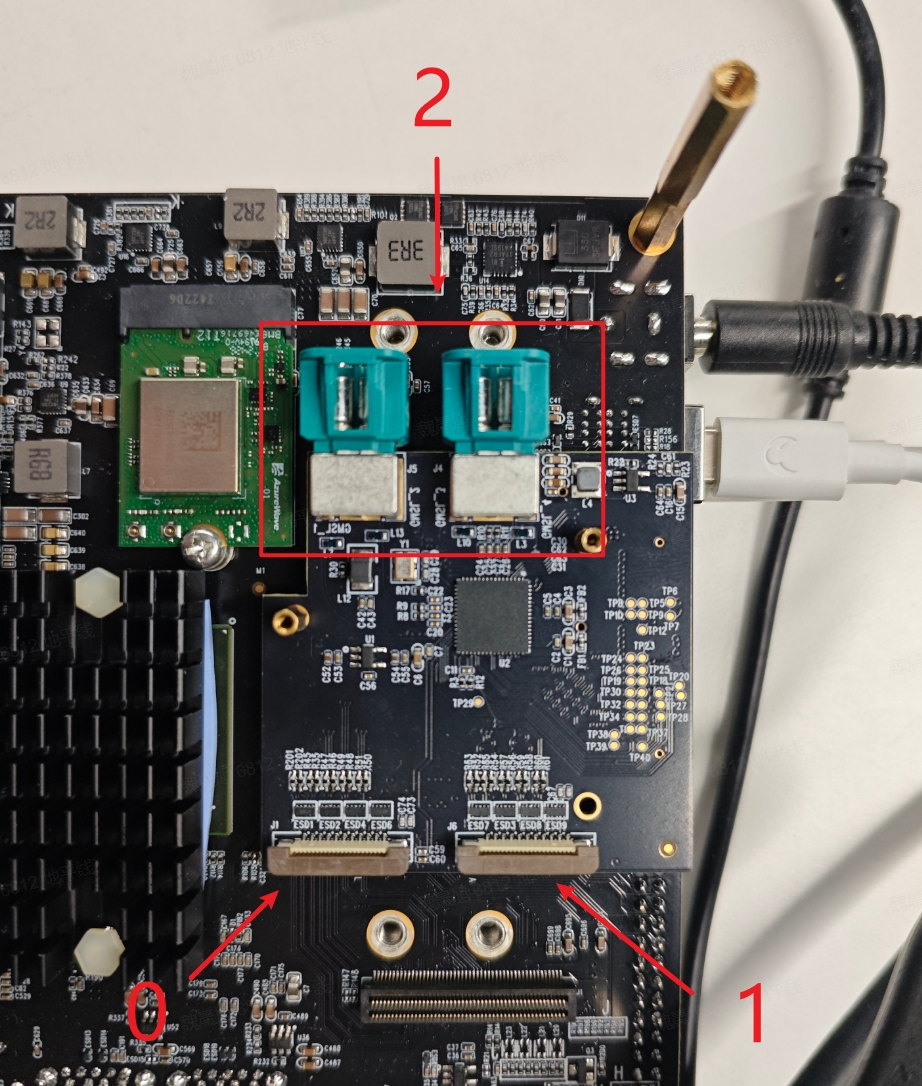
obj: Pointer to the initializedVIOobject.pipe_id: Supports multiple data inputs; it is recommended to set this to 0.video_index: Host ID corresponding to the camera. -1 means auto-detection; for 0, 1, 2, please refer to the "Host ID Selection" section.chn_num: Number of different output resolutions to configure. Maximum is 6; minimum is 1.width: Address of the array specifying output widths.height: Address of the array specifying output heights.
[Return Type]
Returns 0 on success; returns -1 on failure.
sp_open_camera_v2
[Function Prototype]
int32_t sp_open_camera_v2(void *obj, const int32_t pipe_id, const int32_t video_index, int32_t chn_num, sp_sensors_parameters *parameters, int32_t *width, int32_t *height)
[Description]
Initializes the MIPI camera connected to the RDK S100.
Supports specifying the camera's native RAW output resolution via the sp_sensors_parameters structure.
Supports configuring output resolutions—up to 6 different resolution sets—and only downscaling is supported. The downscaling ratio range is [1, 1/64).
Currently supported camera resolutions are listed below:
| Camera | Resolution |
|---|---|
| IMX219 | 1920x1080@30fps (default) |
[Parameters]
obj: Pointer to the initializedVIOobject.pipe_id: Supports multiple data inputs; it is recommended to set this to 0.video_index: Host ID corresponding to the camera. -1 means auto-detection; for 0, 1, 2, please refer to the "Host ID Selection" section.chn_num: Number of different output resolutions to configure. Maximum is 6; minimum is 1.parameters: Structure containing camera RAW output parameters, used to specify resolution and frame rate.width: Address of the array specifying output widths.height: Address of the array specifying output heights.
Members of the sp_sensors_parameters structure are listed below:
| Data Type | Member | Description |
|---|---|---|
| int32_t | raw_height | Height of the camera's RAW output |
| int32_t | raw_width | Width of the camera's RAW output |
| int32_t | fps | Frame rate of the camera's output |
The S100 chip has alignment requirements for VPS output: output width must be 16-byte aligned, and output height must be 2-byte aligned. An error will be reported if your configured width and height do not meet these alignment requirements.
[Return Type]
Returns 0 on success; returns -1 on failure.
sp_open_vps
[Function Prototype]
int32_t sp_open_vps(void *obj, const int32_t pipe_id, int32_t chn_num, int32_t proc_mode, int32_t src_width, int32_t src_height, int32_t *dst_width, int32_t *dst_height, int32_t *crop_x, int32_t *crop_y, int32_t *crop_width, int32_t *crop_height, int32_t *rotate)
[Description]
Opens an image processing module that supports scaling and cropping operations on input images.
[Parameters]
obj: Pointer to the initializedVIOobject.pipe_id: Supports multiple instances, distinguished bypipe_id.chn_num: Number of output images to configure. Maximum is 6; minimum is 1. This correlates with the size of the destination width/height arrays.proc_mode: Processing mode. Currently supported modes:SP_VPS_SCALE(scaling only),SP_VPS_SCALE_CROP(cropping and scaling).src_width: Width of the source frame.src_height: Height of the source frame.dst_width: Address of the array specifying target output widths.dst_height: Address of the array specifying target output heights.crop_x: Array of x-coordinates for the top-left corner of crop regions. PassNULLif cropping is not enabled inproc_mode.crop_y: Array of y-coordinates for the top-left corner of crop regions. PassNULLif cropping is not enabled inproc_mode.crop_width: Array of crop region widths. PassNULLif cropping is not enabled inproc_mode.crop_height: Array of crop region heights. PassNULLif cropping is not enabled inproc_mode.rotate: Array of rotation angles. Rotation is currently unsupported; passNULL.
The S100 chip has alignment requirements for VPS output: output width must be 16-byte aligned, and output height must be 2-byte aligned. An error will be reported if your configured width and height do not meet these alignment requirements.
[Return Type]
Returns 0 on success; returns -1 on failure.
sp_vio_close
[Function Prototype]
int32_t sp_vio_close(void *obj)
[Description]
Closes either the camera or VPS module, depending on whether the provided obj corresponds to an opened camera or VPS instance.
[Parameters]
obj: Pointer to the initializedVIOobject.
[Return Type]
Returns 0 on success; returns -1 on failure.
sp_vio_get_frame
[Function Prototype]
int32_t sp_vio_get_frame(void *obj, char *frame_buffer, int32_t width, int32_t height, const int32_t timeout)
[Description]
Acquires image frame data at the specified resolution (the resolution must have been configured during module initialization; otherwise, acquisition will fail). The returned data format is NV12 YUV.
[Parameters]
obj: Pointer to the initializedVIOobject.frame_buffer: Pointer to a pre-allocated memory buffer for storing the retrieved image. Since the acquired image is always inNV12format, the required buffer size can be calculated using the formulaheight * width * 3 / 2, or by using the provided macroFRAME_BUFFER_SIZE(w, h).width: Width of the image to be stored inframe_buffer. Must match one of the output widths configured insp_open_cameraorsp_open_vps.height: Height of the image to be stored inframe_buffer. Must match one of the output heights configured insp_open_cameraorsp_open_vps.timeout: Timeout for frame acquisition, in milliseconds (ms). Typically set to2000.
[Return Type]
Returns 0 on success, -1 on failure.
sp_vio_get_raw
[Function Prototype]
int32_t sp_vio_get_raw(void *obj, char *frame_buffer, int32_t width, int32_t height, const int32_t timeout)
[Description]
Obtains raw image data from the camera.
[Parameters]
obj: Pointer to an already initializedVIOobject.frame_buffer: Pointer to a pre-allocated memory buffer used to store the retrieved raw image. The required buffer size (in bytes) can be calculated using the formula:(height * width * bit depth) / 8.width: PassNULLwhen retrieving raw image data.height: PassNULLwhen retrieving raw image data.timeout: Timeout duration (in milliseconds) for acquiring the image; typically set to2000.
[Return Type]
Returns 0 on success, -1 on failure.
sp_vio_get_yuv
[Function Prototype]
int32_t sp_vio_get_yuv(void *obj, char *frame_buffer, int32_t width, int32_t height, const int32_t timeout)
[Description]
Obtains YUV data from the camera's ISP module.
[Parameters]
obj: Pointer to an already initializedVIOobject.frame_buffer: Pointer to a pre-allocated memory buffer used to store the retrieved image. Currently, all retrieved images are inNV12format, so the required buffer size can be calculated using the formula:height * width * 3 / 2, or alternatively by using the provided macroFRAME_BUFFER_SIZE(w, h).width: PassNULLwhen retrieving ISP YUV data.height: PassNULLwhen retrieving ISP YUV data.timeout: Timeout duration (in milliseconds) for acquiring the image; typically set to2000.
[Return Type]
Returns 0 on success, -1 on failure.
sp_vio_set_frame
[Function Prototype]
int32_t sp_vio_set_frame(void *obj, void *frame_buffer, int32_t size)
[Description]
When using the vps module, source data must be fed into the system via this interface. The data in frame_buffer must be in NV12 format and have the same resolution as the original frame specified when calling sp_open_vps.
[Parameters]
obj: Pointer to an already initializedVIOobject.image_buffer: Image frame data to be processed. Must be inNV12format and match the resolution of the original frame used when callingsp_open_vps.size: Frame size.
[Return Type]
Returns 0 on success, -1 on failure.
Host ID Selection
The host IDs corresponding to each camera are shown in the figure below: